

What Is Generative Engine Optimisation (GEO) and Why Every Shopify Brand Needs It in 2026
Introduction
A customer asks ChatGPT for the best sustainable skincare brand for sensitive skin. Another asks Perplexity to recommend a Shopify designer in the UK. A third asks Google’s AI Overview which subscription coffee brand is worth trying.
In each case, the AI gives a direct answer with no list of ten blue links to scroll through. It cites specific brands, makes specific recommendations, and the customer either acts on that or moves on. Your brand either appears in that answer, or it does not.
If you have already read my Shopify Agentic Storefronts article, think of this as the companion piece. That article covers the transaction, Shopify’s specific feature that enables checkout to happen directly inside AI conversations. This article covers the discovery, how you make sure your brand shows up in AI responses in the first place, across every platform, whether a purchase happens in-chat or not. You need both, but discovery comes first.
As a Shopify Expert working with DTC brands and ecommerce businesses, I have seen this shift firsthand. I now regularly receive enquiries through AI channels – people who described what they were looking for to ChatGPT, Claude, or an AI Overview in Google Search, and my name came up as a recommendation. Several of those enquiries have turned into real projects. That was simply not happening two years ago. The channel is real, it is growing, and it is already sending paying work to the brands and businesses that have, often without realising it, built the right foundations.
Generative engine optimisation (GEO) is the practice of structuring your content, your brand presence, and your data so that AI platforms can understand, trust, and cite you when answering questions relevant to your business. This article explains what it is, how it differs from traditional SEO, and what Shopify brands can do right now to build visibility in AI search.
1. What Is Generative Engine Optimisation?
GEO is the process of optimising your content and brand presence to be cited by AI-powered platforms when they generate answers to user queries.
Traditional SEO focuses on getting your pages to rank in a list of search results. A user types a query, Google returns ten links, and the goal is to be as high up that list as possible.
GEO works differently. When someone asks an AI a question, the AI does not return a list of links. It synthesises an answer from multiple sources, often citing the ones it draws from most heavily. The goal of GEO is to be one of those cited sources, the brand or piece of content the AI reaches for when the topic is relevant to you.
The platforms where this matters in 2026 include ChatGPT, Google AI Overviews, Google Gemini, Perplexity, Claude, and Microsoft Copilot. Each works slightly differently under the hood, but all of them reward the same underlying qualities: authority, clarity, trustworthiness, and well-structured information.
One statistic worth taking seriously: research shows that fewer than 10% of the sources cited in AI responses match the top 10 Google organic results for the same query. Strong traditional SEO does not automatically translate to AI visibility. They overlap, but they are not the same thing.
2. How AI Platforms Decide What to Cite
Understanding why AI platforms choose certain sources over others is the foundation of any effective GEO strategy.
Most AI search tools use a technique called retrieval-augmented generation (RAG). When a user asks a question, the AI breaks it into multiple sub-queries, searches for relevant sources, retrieves the most useful passages, and synthesises them into a single answer. It is not matching keywords. It is matching concepts and evaluating quality.
What AI systems look for when selecting sources:
Authority and trust
AI platforms weight credibility heavily. A brand with genuine reviews across multiple platforms, mentions from credible third-party sources, accurate and consistent information across the web, and a well-established domain is far more likely to be cited than a brand with no external validation.
Clarity and structure
AI systems retrieve content that is easy to parse. Content that answers questions directly, uses clear headings, and provides specific facts with supporting context is much easier for AI to extract and synthesise than dense prose that buries the point.
Relevance and specificity
AI platforms favour content that addresses a topic comprehensively and accurately. A product description that clearly states materials, dimensions, use cases, and compatibility is more useful to an AI than one that leads with lifestyle copy.
Recency
AI systems tend to favour recently updated content over stale pages. A guide published in 2023 with no updates will lose ground to a 2026 article covering the same topic with current information.
Brand presence across platforms
AI models draw on far more than your website. Reddit, Wikipedia, Trustpilot, Google Business Profile, industry directories, press mentions – all of these feed into how AI systems build their understanding of your brand. The more consistently and positively your brand appears across these surfaces, the stronger your AI visibility.
3. GEO vs SEO: What's the Same and What's Different
GEO is not a replacement for SEO. It is an additional layer built on the same foundations – and the good news is that a lot of the work overlaps.
What carries across from SEO
High-quality content, technical accessibility, clear site structure, backlinks from authoritative sources, and a fast-loading site all matter for both. The brands with the strongest SEO foundations tend to also have the strongest starting point for GEO.
What GEO adds
SEO focuses on ranking positions. GEO focuses on being cited – which means brand presence across the whole web matters, not just your own domain. Your reviews on Google, your mentions on industry sites, your presence on platforms like LinkedIn and Clutch, your customer reviews on Trustpilot – all of these feed AI visibility in a way they do not directly influence traditional rankings.
Where they diverge most
SEO rewards optimising for specific keywords. GEO rewards topic authority – covering a subject comprehensively, answering the real questions customers have, and building the kind of brand trust that shows up across multiple independent sources. You cannot game GEO with keyword density. AI systems are evaluating the actual quality and credibility of your content and your brand.
The practical implication for Shopify brands is straightforward. If you have been investing in SEO – publishing good content, building reviews, earning backlinks – you already have a foundation for GEO. The question is whether your content is structured in a way that AI can easily retrieve and cite, and whether your brand presence extends beyond your own website.
4. Why This Matters Specifically for Shopify Brands
Every ecommerce business is affected by GEO, but Shopify brands have some specific considerations worth understanding.
Product discovery is shifting
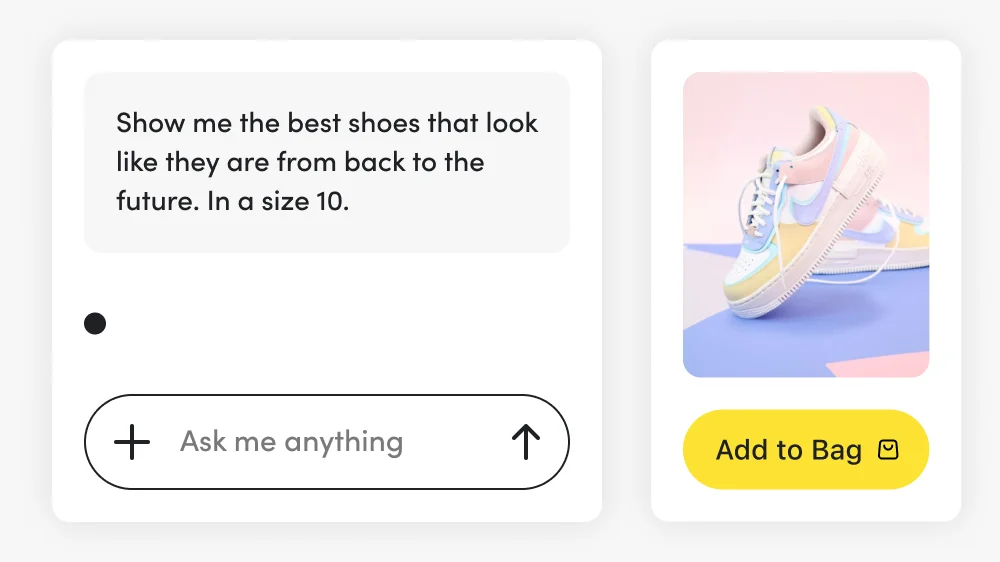
A customer asking “what’s the best lightweight running jacket under £100?” is increasingly getting a direct answer from an AI, with specific products recommended, rather than a list of pages to browse. If your products are not described with the specificity that allows AI to understand and recommend them, you are invisible in that moment.
Brand differentiation matters more than ever
AI systems synthesise information from many sources and tend to recommend brands that are clearly defined, well-reviewed, and specifically positioned. A generic brand with thin product descriptions and few external mentions is harder for an AI to confidently recommend than a brand with a clear identity, rich product data, and genuine third-party validation.
The post-purchase experience feeds AI visibility
Customer reviews are one of the strongest trust signals AI platforms use. Brands that actively collect reviews – and respond to them – are building AI visibility with every new piece of social proof. This is not separate from your conversion rate optimisation work. It is the same work with an additional benefit.
DTC brands are particularly exposed
For DTC brands where the store is the entire customer relationship, AI-driven discovery is both a threat and an opportunity. A well-positioned DTC brand with strong reviews, clear brand voice, and comprehensive product information can build disproportionate AI visibility relative to its actual size. The playing field is flatter in AI search than in paid advertising.
5. The Connection to Agentic Commerce
GEO and Shopify Agentic Storefronts are closely related but solve different problems, and understanding the distinction is worth a moment.
Shopify Agentic Storefronts is a specific feature that enables checkout to happen directly inside an AI conversation on platforms like ChatGPT or Gemini. A customer finds your product, the AI surfaces it, and they can complete the purchase without leaving the chat. That is the transaction layer. Worth noting if you have not read that article: Agentic Storefronts is currently only available in the United States and has not yet rolled out to UK merchants. UK stores will be notified in their Shopify admin when it becomes available.
GEO is the discovery layer, the reason the AI surfaces your brand in the first place. It operates across every AI platform, not just the ones Shopify has integrated with, and it applies whether a purchase happens in-chat, on your website, or not at all. A customer who asks Claude to recommend a Shopify designer and then emails you directly has come through GEO. So has a customer who discovers your brand in a Google AI Overview and clicks through to your store. And crucially for UK brands right now, GEO applies in full even though Agentic Storefronts has not arrived here yet.
The relationship between them is straightforward: GEO gets you into the conversation. Agentic Storefronts enables the transaction to happen there. Without GEO working in your favour, Agentic Storefronts has no one to close. Without Agentic Storefronts, customers who find you through AI have to click through to your store to buy. For UK brands today, that means GEO is the part you can and should be building right now.
The foundational work is largely the same for both. If you have read the Shopify Agentic Storefronts article and started on those steps, you are already building your GEO foundation at the same time.
6. What to Do: GEO for Shopify Brands
Here is where this becomes practical. These are the steps that make the most difference for Shopify brands looking to build AI visibility.
Structure your content to answer questions directly
AI systems favour content that gets to the point. Lead sections with the direct answer, then add context and detail below. This is not just good GEO practice – it improves readability for human visitors too. If someone asks “does this product work for sensitive skin?” your product page should answer that question clearly and near the top, not bury it in paragraph five of the description.
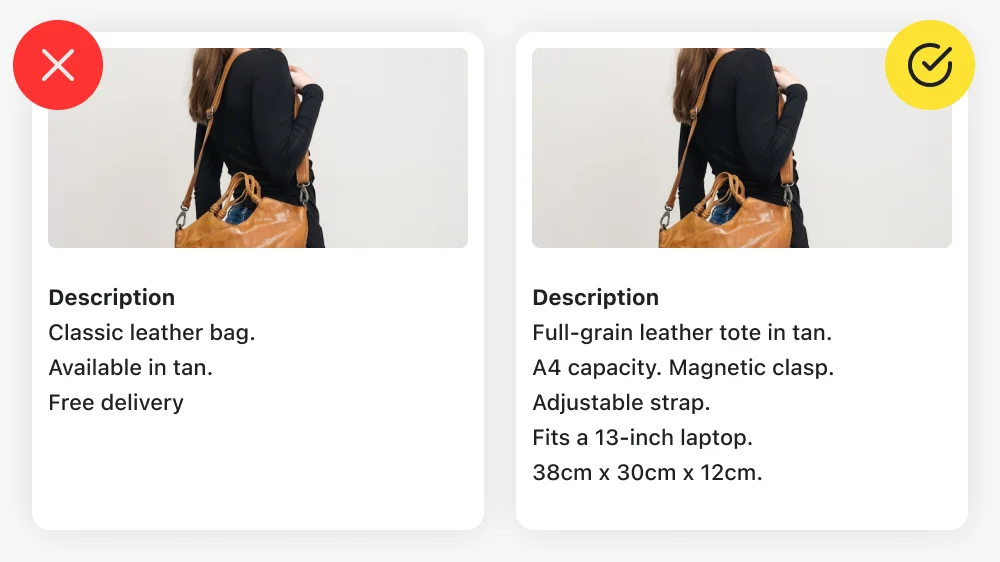
Make your product descriptions machine-readable, not just human-readable
A description that tells a compelling story but omits the material composition, dimensions, compatibility, or key specifications is leaving AI with nothing useful to work with. Include both. The lifestyle copy and the functional facts can coexist, and should.
Build and actively manage your reviews
Reviews are one of the strongest signals AI platforms use to evaluate brand credibility. Not just on your own site – on Google Business Profile, Trustpilot, Clutch (for service businesses), and any relevant industry directories. Make collecting reviews a consistent part of your post-purchase process, not an afterthought. Respond to reviews publicly where possible. AI systems can see that activity.
Publish content that demonstrates genuine expertise
Original insights, case studies, and articles that draw on real experience are far more likely to be cited by AI than generic content that exists primarily to rank. The articles on this site are a direct example of this strategy in action. Each piece addresses a specific question that Shopify brands have, draws on real project experience, and aims to be the most useful answer available on that topic.
Earn mentions from credible third-party sources
AI systems weight external validation heavily. Press coverage, directory listings, guest contributions to industry publications, podcast appearances, case studies published by clients – all of these build the kind of distributed brand presence that AI platforms recognise as authority. Backlinks matter for SEO, and the same sources that provide backlinks tend to provide the external mentions that matter for GEO.
Keep your brand information consistent across all platforms
Inconsistent NAP (name, address, phone) information, outdated bios, mismatched positioning across different platforms – all of these create confusion for AI systems trying to build a coherent picture of your brand. Audit your presence across Google Business Profile, LinkedIn, Clutch, DesignRush, and any other directories where you appear. Make sure everything is accurate and current.
Check your robots.txt is not blocking AI crawlers
This is a technical step worth verifying. Some site configurations – particularly those using Cloudflare – have begun blocking AI bots by default. If AI crawlers cannot access your site, your content cannot be retrieved and cited regardless of its quality. Check your robots.txt file and your server logs for AI bot traffic.
Consider an llms.txt file
This is an emerging convention – a simple text file at the root of your domain that helps AI systems understand your site’s structure and purpose. It is the AI equivalent of a sitemap. Not yet universal, but worth implementing as the standard matures.
7. GEO Is Already Sending Real Work
It is worth being direct about this, because the numbers are easy to dismiss as theoretical until you see them in your own analytics.
I now receive a regular stream of enquiries that can be traced back to AI channels. People who described what they were looking for to ChatGPT, Claude, or a Google AI Overview, received a recommendation, and got in touch. Several of those have turned into real projects. That attribution is trackable in GA4 as AI referral traffic and it has grown consistently month on month over the past year.
This is not a future trend to prepare for. It is a channel that is already open and already converting. The brands and businesses appearing in those recommendations did not do anything exotic to get there. They published useful content, collected genuine reviews, maintained consistent information across the web, and built the kind of external credibility that AI systems recognise as authority.
The window where this is straightforward to build before the competition catches up will not stay open indefinitely. The practical steps in Section 6 are the right place to start.
8. Measuring Your GEO Performance
This is the area where GEO lags furthest behind traditional SEO – measurement tools are still maturing. But there are practical ways to track progress.
Track AI referral traffic in GA4
Set up custom channel groupings to capture traffic from AI platforms. Look for referrals from chat.openai.com, perplexity.ai, gemini.google.com, bing.com/chat, and claude.ai. This traffic is growing and is increasingly trackable as AI platforms include referral data.
Test your own brand in AI platforms manually
Ask ChatGPT, Gemini, and Perplexity about your products, your services, and your category. What comes up? What competitors appear? What information is present or missing? This is the most direct view of your current AI visibility and the gaps in your data or positioning.
Monitor review volume and sentiment
Since reviews are a core trust signal for AI, tracking your review count and average rating across platforms is a reasonable proxy for your AI credibility over time.
Watch for AI Overview appearances in Google Search Console
Google is increasingly reporting data on AI Overview appearances. As this data matures, it will give a clearer picture of how often your content is being surfaced in AI-generated responses within Google Search.
The honest position is that GEO measurement is still developing. The brands building GEO foundations now – through content quality, review generation, and brand presence – will be the ones with the data and the visibility advantage when measurement tools catch up.
Conclusion
Generative engine optimisation is not a technical discipline for large enterprises with dedicated SEO teams. It is the logical extension of everything good Shopify brands should already be doing – publishing useful content, building genuine reviews, maintaining consistent brand information, and demonstrating expertise through real work.
The shift is happening whether you engage with it or not. AI platforms are already recommending products, services, and brands to millions of people every day. The brands being recommended are not always the biggest or the best-funded. They are the ones with the clearest positioning, the strongest external validation, and the most structured, accessible information.
For UK Shopify brands, the competitive window is genuinely open right now. Most businesses in your category have not started thinking about GEO seriously. The brands that build this foundation in 2026 will have compounding advantages as AI search continues to grow.
The good news is that the starting point is the same as it has always been: be excellent, document it well, collect the proof, and make sure the world can find it.
If you want to think through how GEO fits alongside your store’s design, content, and Shopify web design services, get in touch directly.
Frequently Asked Questions About Generative Engine Optimisation
Generative engine optimisation (GEO) is the practice of structuring your content and brand presence so that AI platforms – including ChatGPT, Google Gemini, Perplexity, Claude, and Microsoft Copilot – cite and recommend your brand when generating answers to user queries. Unlike traditional SEO, which focuses on ranking positions in a list of links, GEO focuses on being included in the AI’s synthesised answer itself.
SEO optimises for ranking positions in traditional search results. GEO optimises for being cited in AI-generated answers. They share the same foundations – quality content, technical accessibility, authoritative backlinks – but GEO additionally requires strong brand presence across third-party platforms, structured content that AI can easily parse, and consistent external validation through reviews and mentions. Fewer than 10% of AI citations match the top 10 Google results for the same query, which means strong SEO does not automatically translate to AI visibility.
No. GEO is an additional layer built on top of SEO, not a replacement. Traditional search still drives significant traffic and remains important. The brands with the strongest GEO visibility tend to also have strong SEO foundations. Think of GEO as extending your visibility into the growing portion of search that is now happening through AI conversations rather than traditional search results pages.
Product discovery is increasingly happening inside AI conversations. A customer asking an AI to recommend a product in your category will get a direct answer with specific brand recommendations. If your products are not described with sufficient specificity – materials, dimensions, use cases, compatibility – AI has little to work with when making that recommendation. Shopify brands also benefit disproportionately from reviews, which are one of the strongest trust signals AI platforms use to evaluate brand credibility.
AI platforms evaluate authority, clarity, trustworthiness, and relevance. They weight credibility signals heavily – genuine reviews across multiple platforms, mentions from credible third-party sources, consistent brand information, and well-structured content that answers questions directly. They also draw on far more than your website: Reddit, Trustpilot, Google Business Profile, industry directories, and press mentions all feed into how AI systems understand and evaluate your brand.
Build and actively manage your reviews. Reviews are one of the strongest and most consistent signals AI platforms use to assess brand credibility – across Google Business Profile, Trustpilot, and any relevant industry directories. Make collecting genuine reviews a regular part of your post-purchase process. This single action builds AI visibility, improves conversion rate, and strengthens traditional SEO simultaneously. After that, audit your product descriptions for specificity and make sure your brand information is consistent across all platforms where you appear.
No. In some ways GEO is more democratic than paid search. A well-positioned small brand with strong reviews, clear expertise, and consistent external mentions can earn AI recommendations over larger competitors with weaker brand signals. The playing field is flatter in AI search than in paid advertising, where budget largely determines visibility.
They are related but distinct. GEO is about being visible and cited in AI responses generally. Agentic Storefronts is Shopify’s specific feature enabling checkout to happen directly inside AI conversations. GEO gets you into the conversation. Agentic Storefronts enables the transaction to happen there. The foundational work – clean product data, clear brand voice, genuine reviews – underpins both.
Track AI referral traffic in GA4 by setting up custom channel groupings for platforms like chat.openai.com, perplexity.ai, and claude.ai. Test your own brand manually in AI platforms – ask ChatGPT or Gemini about your products or services and see what appears. Monitor your review volume and sentiment across platforms. As Google Search Console matures its AI Overview reporting, this will provide more direct visibility data. GEO measurement tools are still developing, but these steps give a practical starting point today.

This article was written by Anthony Bliss, a Shopify Expert & Freelance Shopify Designer specialising in UX and UI design for DTC brands. With 20+ years of design experience and 6+ years focused exclusively on Shopify, Anthony helps brands create stores that convert.
Let’s create your Shopify success story
Shopify Success Stories

Shopify Migration with Custom & Conversion focussed UX
Drink Finder

Bespoke Shopify Subscription UX and UI and design system
Fuzzball

A fresh mobile-first design system and bespoke product page UX
Hartnack & Co
More Shopify Articles
What Is Generative Engine Optimisation (GEO) and Why Every Shopify Brand Needs It in 2026
Getting found online used to mean one thing: ranking on Google. That is still important. But a growing share of product discovery is now happening…
Shopify Agentic Commerce: What UK Brands Need to Know
The way people discover and buy products online is changing faster than at any point since mobile shopping took off. AI assistants are no longer just…
How to Design a Shopify Website in 2026 (And When to Hire Someone Instead)
Designing a Shopify website in 2026 is not the same as it was five years ago. The platform has matured, customer expectations have risen, and the gap…
Shopify Expert
Ready to elevate your store? Start your Shopify transformation today
Shopify expert who can help elevate your store to the next level
20 years of agency and direct client experience, without the high price tag
Network of the best developers, Klaviyo experts & SEO experts perfect for big projects
This site is protected by reCAPTCHA and the Google Privacy Policy and Terms of Service apply.
Get in touch
Registered in England & Wales No. 10575474. Based in Falmouth, Cornwall, UK.

Shopify Agentic Commerce: What UK Brands Need to Know
Introduction
A year ago, almost every ecommerce purchase started with a Google search. You typed in what you wanted, clicked through to a store, browsed, and bought. That path still exists, but a growing number of shoppers are skipping it entirely. They are opening ChatGPT, Claude, Google Gemini, or Microsoft Copilot, describing what they need, and buying directly from the AI’s response.
And it is not just product purchases. This shift is happening across service industries too. I receive a meaningful and growing number of enquiries through AI channels, people who have asked an AI assistant to find them a Shopify designer, and my name has come up across ChatGPT, Claude, and others. That is not something I would have said twelve months ago. For any business with an online presence, AI is increasingly part of how new clients and customers find you, regardless of what you sell.
As a Shopify Expert working with brands on design, UX, and conversion, I have been watching this closely. Orders attributed to AI platforms on Shopify grew 15 times over the course of 2025. That is not a rounding error. It is a behaviour change, and Shopify has responded with one of the most significant new features it has launched in years.
This article explains what Shopify Agentic Storefronts actually are, how the technology works, what it means practically for your store, and what you can do right now to prepare — including if you are in the UK, where the full feature is not yet available.
1. What Is Agentic Commerce?
Before getting into Shopify’s specific feature, it is worth understanding what agentic commerce actually means, because the term gets used loosely.
Agentic commerce is what happens when an AI assistant moves beyond giving advice and starts taking action. Earlier AI tools would tell you the best running shoes for wide feet. An AI agent will find them, compare prices across stores, check your size is in stock, and complete the checkout — all within the same conversation.
The key difference is this: conversational commerce helps you decide. Agentic commerce helps you buy. The AI is not just a smarter search engine. It is acting as a personal shopper that can execute transactions on your behalf.
For Shopify merchants, this represents a fundamental shift in how the purchase journey works. Your website is no longer the only entry point into your store. It is one of many. Customers can now discover and buy your products without ever seeing your homepage, your navigation, your product photography, or your carefully designed checkout flow.
It is worth noting that not all AI assistants are equal in this context. ChatGPT, Google Gemini, Microsoft Copilot, and Perplexity are the platforms currently integrated with Shopify’s Agentic Storefronts feature. Claude, Anthropic’s AI assistant, is widely used and increasingly influential in how people discover products and services — including this site — but is not currently one of Shopify’s formally integrated channels. That may change. In the meantime, the trust and brand signals that make you visible in Claude’s responses are the same ones that matter across all AI platforms: reviews, credible backlinks, consistent brand presence, and well-structured content.
2. What Are Shopify Agentic Storefronts?
Shopify Agentic Storefronts is the feature Shopify launched in its Winter ’26 Edition in January 2026. It connects your Shopify store directly to the major AI platforms — currently ChatGPT, Microsoft Copilot, Google AI Mode, Google Gemini, and Perplexity — so that your products can be discovered and purchased inside AI conversations.
The setup is straightforward on paper. You enable it once in your Shopify admin, choose which AI platforms you want to sell through, and Shopify handles the distribution. There are no separate integrations to build for each platform.
When a customer asks an AI assistant for product recommendations, the AI can pull from Shopify’s catalog, surface your products with accurate pricing and availability, and offer a direct checkout experience inside the conversation. The customer never needs to visit your store. The order appears in your Shopify admin with full channel attribution, just like any other order.
You remain the merchant of record throughout. You control pricing, policies, and the post-purchase experience. You can toggle individual platforms on or off. And you can hide specific products from AI channels if you do not want them included.
3. The Technology Behind It
Understanding how this works under the hood is useful, because it explains why product data quality matters so much.
Shopify Catalog is the central layer. It is a global, structured database of products from millions of Shopify merchants. When you enable Agentic Storefronts, your products are syndicated through Shopify Catalog to AI platforms via direct API. Shopify automatically infers categories, extracts attributes, consolidates variants, and ensures prices and inventory stay current. This is what makes the one-setup-for-all-platforms model possible.
Universal Commerce Protocol (UCP) is an open standard co-developed by Shopify and Google, launched in January 2026. It is essentially a shared language that allows AI agents to interact with any merchant’s checkout reliably and consistently, regardless of platform. Think of it as the technical foundation that makes buying inside an AI conversation work properly rather than redirecting you elsewhere.
The Knowledge Base App is a Shopify app that sits separately from your store’s front end. It lets you provide AI agents with structured information about your brand — FAQs, return policies, shipping details, brand voice guidelines. This is only visible to AI agents, not to customers on your website. It is how you influence the way AI platforms talk about your brand in conversations.
The distinction between discovery and selling is worth being clear on. Your products can already show up in AI recommendations through web scraping and product feeds, whether you have done anything or not. What Agentic Storefronts adds is the ability for customers to complete checkout inside the AI channel itself. Without it enabled, a customer who finds your product through an AI will be redirected to your store. With it enabled, they can buy without leaving the conversation. That friction difference matters.
4. The UK Situation
This section matters if you are a UK merchant, which most readers here will be.
At the time of writing in March 2026, Shopify Agentic Storefronts is in early access and limited to stores based in the United States, selling to US customers. UK merchants cannot currently enable the full feature. You will receive a notification in your Shopify admin when it becomes available to you.
This does not mean you should ignore it. The rollout is active and expanding, and the preparatory work you do now will put you in a much stronger position when it arrives. Several of the most important steps — improving your product data, auditing your descriptions, setting up the Knowledge Base app, and making sure your store policies are complete — are things you can and should be doing regardless.
UK brands that are ready when the feature rolls out here will have a meaningful head start over those who wait until it lands and then start scrambling.
5. What This Means for How You Present Your Products
This is the part I find most interesting from a design and brand perspective, and the part most articles on this topic skip over.
When a customer visits your Shopify store, they experience everything you have designed: the photography, the layout, the hierarchy, the copy, the trust signals, the product page structure. All of that work goes into shaping how they feel about your brand and whether they convert.
When an AI agent queries your catalog, it does almost the opposite. It does not see your design at all. It parses structured data fields. It reads your product title, your description, your attributes, your variant information, your pricing. If that information is vague, incomplete, or written purely for visual presentation on a product page, the AI has much less to work with — and a much smaller chance of recommending your product accurately.
This is a meaningful shift for brands that have invested heavily in the visual experience of their store but less carefully in the underlying product data.
A product title that says “Classic Tote — Tan” is harder for an AI to match to a query than “Leather Tote Bag in Tan — Structured, A4 capacity, magnetic clasp, 100% full-grain leather”. A product description that leads with lifestyle copy about the feeling of summer mornings gives an AI agent very little to work with when someone asks for a bag that fits a 13-inch laptop and a water bottle.
This does not mean abandoning good copy. It means making sure the functional, descriptive information is present alongside it. The two can coexist.
6. Getting Your Product Data Ready
If you want your products to show up accurately in AI recommendations and convert when they do, the quality of your underlying catalog data is the foundation. Here is what to focus on.
Product titles need to be descriptive and literal. Include the product type, key material or format, and the attributes that differentiate it. Keep them under 150 characters. An AI agent comparing multiple products needs to parse the title, not decode a brand name or a creative flourish.
Product descriptions need to answer the questions a buyer would have. What is it made of? What size or dimensions? What is it suitable for? What are the relevant specifications? These are the facts an AI agent needs to make an accurate recommendation. If your description is entirely lifestyle-focused, the agent is working blind on the functional details.
Variants should be structured clearly. If you sell in multiple colours, sizes, or configurations, the variant data needs to be clean and consistent. Fragmented or inconsistently named variants are one of the most common reasons products are poorly represented in AI recommendations.
Store policies — shipping, returns, terms of service — need to be complete and in place. These are a requirement for enabling Agentic Storefronts and they also feed directly into how AI agents answer customer questions about your brand.
Shopify’s Catalog Mapping feature is worth using if you have custom data structures, metafields, or unconventional product groupings. It lets you map your specific data to the standard fields AI channels expect, so your products are interpreted correctly.
7. Your Brand Voice in AI Conversations
One of the less obvious concerns about agentic commerce is brand control. When someone buys from your website, you have designed every touchpoint. When they discover and buy through an AI conversation, the AI is speaking on your behalf — and it will say whatever it can infer from the data available.
The Knowledge Base app is how you take some control back. It is a dedicated space to provide AI agents with structured information they should use when discussing your brand. Your return policy, your shipping terms, your size guides, your most common customer questions and accurate answers to them, and your brand voice guidelines.
Think of it as a briefing document for the AI. The more complete and accurate it is, the more accurately the AI will represent your brand in conversations. A customer asking “does this brand offer free returns?” deserves a correct answer, not an inferred one.
This is particularly important for brands in premium or considered-purchase categories, where trust and accuracy matter enormously at the point of decision. If an AI gives a customer wrong information about your returns policy and they buy based on that, you have a problem regardless of whose fault it technically was.
8. The Design Implications
The emergence of agentic commerce does not make your website irrelevant. Far from it. For most UK brands, the purchase journey through a traditional store will remain dominant for years. But it does add a new layer of thinking to how stores should be designed and how products should be presented.
Customers who discover your products through AI and click through to complete a purchase on your store still land on your product page. That experience still needs to convert them. The difference is that they will arrive with different expectations — they have already been told what the product is, they may already have decided to buy, and they are coming to your store to complete the transaction rather than to be convinced.
That changes the job of your product page slightly. Trust signals and a frictionless checkout become even more important. The customer has done their research in the AI conversation. Your store needs to confirm, reassure, and close — not start the selling process from scratch.
There are also upsell and cross-sell implications worth thinking about. When a customer buys directly inside an AI conversation, they bypass the upsell and cross-sell logic you have designed into your store. Post-purchase email flows become more important than ever in this scenario, as the AI channel checkout removes the in-store moments where you would typically surface related products.
For DTC brands especially, where retention and lifetime value are central to the business model, the post-purchase relationship matters as much as the sale itself.
9. What To Do Right Now
Whether or not Agentic Storefronts is available on your plan yet, here are the steps that make sense to take now.
Start by auditing your product descriptions against the standards above. Pick your twenty top-selling products and ask honestly: could an AI agent accurately describe what this is, who it is for, and what makes it different, based only on the title and description? If the answer is no, rewrite them. This improves your standard product pages too, so it is never wasted work.
Make sure your store policies — shipping, returns, terms of service — are in place and complete. These are a prerequisite for Agentic Storefronts and they are good practice regardless.
Install the Knowledge Base app if you are eligible. Even if the selling feature is not live in the UK yet, having your brand information structured and ready means you are not starting from zero when it arrives.
Review your variant structure and product groupings. If you have complex products with many variants, use Shopify’s Combined Listings tool or Catalog Mapping to ensure the groupings make sense to an AI parsing your catalog.
Finally, start testing what AI platforms say about your products right now. Open ChatGPT or Gemini and search for the kind of products you sell. See what comes up. See what information is present or missing. That tells you exactly what the AI is currently working with, and where the gaps are in your data.
The stores that take this seriously now will have an advantage when the full feature lands in the UK. It is the same principle as SEO — the brands that prepare before the competition does are the ones that benefit most when the channel matures.
If you want to think through how any of this intersects with your store’s design and product presentation, take a look at my Shopify web design services or get in touch directly.
10. How AI Decides Who to Recommend
Understanding how AI platforms choose which brands and products to surface is worth thinking about separately from the technical setup, because it has implications beyond Shopify’s specific feature.
AI overview summaries and product recommendations are not just pulling from structured catalog data. They are drawing on signals very similar to the ones that have always mattered in SEO — trust, authority, and reputation. Reviews matter. Backlinks from credible sources matter. Consistent brand presence across platforms matters. A brand that is well-represented across its website, Google Business Profile, third-party directories, press mentions, and review platforms is giving AI more to work with and more reason to recommend it over a competitor with thinner online presence.
This applies across all AI assistants, not just the ones formally integrated with Shopify. Claude, Anthropic’s widely used AI assistant, surfaces brands and services based on the same credibility signals — and is not part of Shopify’s agentic storefront programme at all. When someone asks Claude to recommend a product, a designer, or a service, it is drawing on everything it has indexed: your content, your reviews, your reputation. The same is true of ChatGPT when used outside of the Shopify integration, and of any other AI that a potential customer might be using.
This is particularly relevant for service businesses. When someone asks an AI assistant to recommend a Shopify designer in the UK, the AI is drawing on everything available about the options. A designer with detailed case studies, genuine client reviews, articles that demonstrate expertise, and consistent information across the web is far more likely to appear than someone with a portfolio site and little else.
The practical implication is that the work you may already be doing for SEO — building backlinks, generating reviews, publishing consistent and credible content — is also building your visibility in AI recommendations. Keep your brand voice consistent across every platform you appear on, make sure your Google Business Profile and directory listings are accurate and complete, and keep building genuine social proof. All of that feeds into how AI systems assess your credibility and trustworthiness, regardless of which AI platform a customer happens to be using.
11. The Ads Question and What Comes Next
One thing worth watching closely: advertising in AI channels.
ChatGPT has already begun testing sponsored placements in the US, appearing at the bottom of responses for relevant queries. This is early-stage, limited in scope, and US-only at the moment — but it signals a direction of travel. If AI platforms follow the same commercial path as search engines, paid placements inside AI responses are a matter of when, not if.
If and when that happens, it changes the game considerably. Right now, appearing in AI recommendations is largely earned through data quality, trust signals, and brand credibility. Introduce paid placement and you have a new paid channel to think about alongside Google Ads, Meta, and everything else. The brands that have built strong organic visibility in AI channels early will have a baseline advantage, but the competitive dynamic will shift.
The honest advice for now is to prepare and watch. Get your product data clean, get your brand voice consistent, earn the reviews, and make sure your store is technically ready. Those are the right things to do regardless of what the commercial model looks like in twelve months. This landscape has changed dramatically in a very short space of time and it shows no sign of slowing down. The fundamentals of trust, quality, and consistency are the things most likely to hold their value across whatever comes next.
Conclusion
Shopify Agentic Storefronts is not a gimmick or an experiment. It is Shopify’s response to a real and measurable shift in how people shop. AI-driven commerce orders grew 15 times in 2025. The platforms are live. The infrastructure is built. For US merchants it is already active. For UK brands it is coming.
The good news is that the preparation work is largely the same work that improves your store regardless. Clean product data, accurate descriptions, complete policies, clear brand voice guidelines, genuine reviews, and consistent brand presence across the web — all of these make your store better for human customers too. Agentic commerce just makes them non-negotiable rather than merely advisable.
This has all moved remarkably fast, and it will keep moving. The right response is not to chase every development, but to build on fundamentals that hold their value across whatever comes next — trust, quality, consistency, and a store that represents your brand well everywhere it appears.
Your website remains central. But for the first time, it is no longer the only place commerce can happen for your brand.
Frequently Asked Questions About Shopify Agentic Storefronts
Shopify Agentic Storefronts is a feature launched in Shopify’s Winter ’26 Edition that connects your store to AI platforms including ChatGPT, Microsoft Copilot, Google AI Mode, Gemini, and Perplexity. It allows your products to be discovered and purchased directly inside AI conversations, without the customer needing to visit your store. Orders appear in your Shopify admin with full channel attribution.
Not yet at the time of writing in March 2026. The feature is currently in early access limited to stores based in the United States, selling to US customers. UK merchants will receive a notification in their Shopify admin when it becomes available. The preparatory steps — improving product data, installing the Knowledge Base app, completing store policies — can be taken now.
Agentic Storefronts is active by default for eligible merchants, but you control which AI platforms you sell through. You can toggle individual platforms on or off from your Shopify admin settings. You can also remove specific products from AI channels or opt out entirely if you prefer customers to purchase on your store rather than in-chat.
Yes. Even with Agentic Storefronts enabled, many customers will still click through to your store, particularly for more considered purchases. If you do not enable the native checkout feature, AI channels will redirect customers to your product page. Agentic Storefronts adds a new path to purchase — it does not replace the existing one.
The Universal Commerce Protocol (UCP) is an open standard co-developed by Shopify and Google, launched in January 2026. It creates a shared technical language that allows AI agents to interact with any merchant’s checkout reliably and consistently. For Shopify merchants, much of this is handled automatically.
The Knowledge Base app is a Shopify app that lets you provide AI agents with structured information about your brand — FAQs, return policies, shipping details, and brand voice guidelines. It is only visible to AI agents, not to customers on your store. It is how you influence the way AI platforms represent your brand in conversations.
Shopify has indicated that some channels may include a fee after an initial trial period. The exact commercial terms are evolving and will vary by platform. Check Shopify’s current terms and the terms of each individual AI channel for the latest information.
Shopify’s Catalog Mapping feature lets you map custom fields, metafields, and non-standard product groupings to the standard data structure that AI channels expect. If you have complex products with many variants, the Combined Listings tool helps ensure AI agents see a coherent product rather than fragmented listings.
Not in the near term, particularly for UK brands. The traditional purchase journey through your store remains dominant and will continue to be so for the foreseeable future. What agentic commerce changes is the importance of product data quality and brand voice — the underlying substance that AI agents work from. A well-designed store still matters enormously for the customers who arrive via any channel.
Voice search optimises for being discovered when people use voice assistants to ask questions. Agentic commerce goes further — the AI does not just surface your products, it can complete the purchase. The two share a common thread though: both reward stores that have structured, accurate, descriptive product information rather than relying purely on visual presentation. If you have already worked on voice search optimisation for your Shopify store, you are already thinking in the right direction.
AI recommendations are influenced by many of the same signals as traditional SEO — trust, authority, and reputation. Reviews, backlinks from credible sources, consistent brand presence across the web, and well-structured content all feed into how AI systems assess which brands to surface. A strong Google Business Profile, accurate directory listings, genuine client reviews, and published content that demonstrates expertise all contribute. The work you do for SEO and brand credibility is also building your visibility in AI recommendations.
Possibly. ChatGPT has already begun testing sponsored placements in the US, which signals a direction of travel. If AI platforms follow the same commercial model as search engines, paid placement inside AI responses will become a new channel to consider. The timing and scope are unclear. For now, the best approach is to build strong organic visibility through data quality, brand credibility, and genuine reviews — these are the right foundations regardless of how the commercial model develops.
This article was written by Anthony Bliss, a Shopify Expert & Freelance Shopify Designer specialising in UX and UI design for DTC brands. With 20+ years of design experience and 6+ years focused exclusively on Shopify, Anthony helps brands create stores that convert.
Let’s create your Shopify success story
Shopify Success Stories
Shopify Migration with Custom & Conversion focussed UX
Drink Finder
Bespoke Shopify Subscription UX and UI and design system
Fuzzball
A fresh mobile-first design system and bespoke product page UX
Hartnack & Co
More Shopify Articles
What Is Generative Engine Optimisation (GEO) and Why Every Shopify Brand Needs It in 2026
Getting found online used to mean one thing: ranking on Google. That is still important. But a growing share of product discovery is now happening…
Shopify Agentic Commerce: What UK Brands Need to Know
The way people discover and buy products online is changing faster than at any point since mobile shopping took off. AI assistants are no longer just…
How to Design a Shopify Website in 2026 (And When to Hire Someone Instead)
Designing a Shopify website in 2026 is not the same as it was five years ago. The platform has matured, customer expectations have risen, and the gap…
Shopify Expert
Ready to elevate your store? Start your Shopify transformation today
Shopify expert who can help elevate your store to the next level
20 years of agency and direct client experience, without the high price tag
Network of the best developers, Klaviyo experts & SEO experts perfect for big projects
This site is protected by reCAPTCHA and the Google Privacy Policy and Terms of Service apply.
Get in touch
Registered in England & Wales No. 10575474. Based in Falmouth, Cornwall, UK.
How to Design a Shopify Website in 2026 (And When to Hire Someone Instead)
Introduction
I have been designing Shopify stores as a Shopify Expert for over six years. Before that, I spent 20 years in design across agencies and direct client work, including brands like Dyson and Wrangler. Over time, I have seen the same pattern repeat: brands invest in building a store but underinvest in designing it. They end up with something that looks reasonable but does not perform.
Good Shopify design is not about aesthetics. It is about clarity, trust, and reducing the friction between someone landing on your store and completing a purchase. This guide will walk you through the key stages of designing a Shopify store in 2026, from strategy to launch.
1. Start With Strategy, Not a Theme
Most people start designing a Shopify store by picking a theme. That is the wrong place to start.
Before you open the theme store, you need to understand three things: who your customer is, what they need to feel confident enough to buy, and where your current store (if you have one) is losing them.
This is the foundation of everything else. If you do not know whether your customers are primarily mobile shoppers who buy quickly on impulse, or desktop researchers who compare products for days, you cannot make sensible decisions about navigation, product page structure, or checkout flow.
For new stores, this means doing the thinking upfront. Who are your competitors? What do their stores do well? Where is the gap? For existing stores, Google Analytics and tools like Hotjar will show you where people are dropping off. That data is worth far more than any aesthetic inspiration board.
I spend time on this before every project. The UX review I do at the start of a project is what makes the rest of the design process purposeful rather than decorative. If you want to see how this approach plays out in practice, take a look at some of my Shopify case studies.
2. Theme or Bespoke? How to Make the Right Call
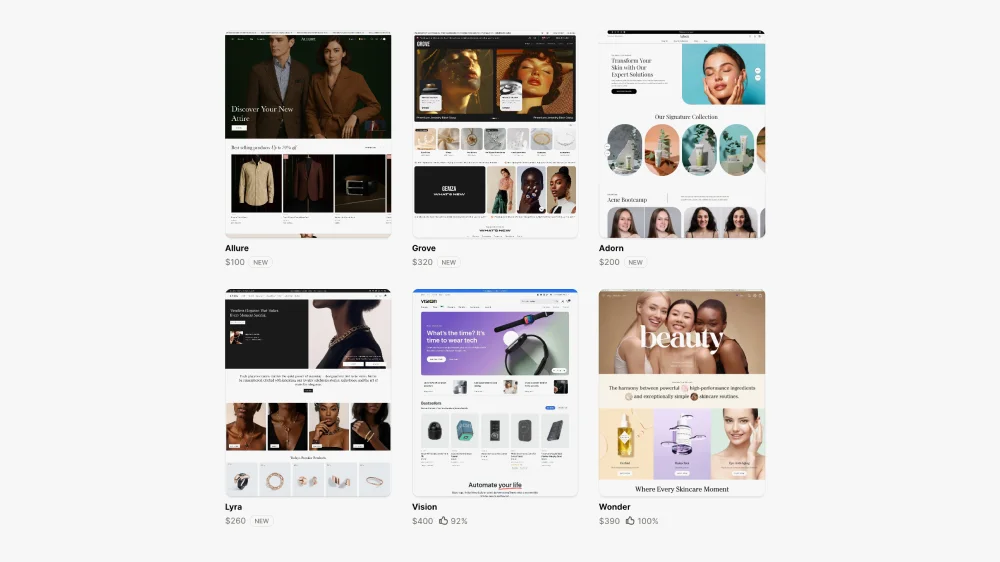
Shopify’s theme store has improved significantly. There are now well-built themes at various price points, and Shopify’s own free theme, Dawn, is a solid starting point. Premium paid themes like Impulse, Motion, and Prestige can look excellent with a good eye and thoughtful setup.
The honest answer is that themes are brilliant for the right situation, and a real constraint in others. The decision should be based on where you are in your business, not just budget.
When a theme is the right choice
If you are launching a new store or testing a new concept, a premium theme is often exactly the right call. You do not yet have the data to justify the investment in bespoke design, and a well-chosen theme with strong visual instincts can look and perform well. Get the store live, start collecting data on how your customers actually behave, and build from there. Spending significant money on a bespoke build before you understand your customers’ purchase journey is putting the cart before the horse.
Themes also work well when your product range is focused, your brand is relatively straightforward to express within standard Shopify sections, or budget is a genuine constraint right now.
When bespoke design is worth the investment
The point at which bespoke design pays for itself is when you have real data to work with. Once you know whether customers are using search, which collections they navigate to, where they drop off, and how they move through the purchase journey, you can make genuinely informed design decisions rather than educated guesses.
That data changes everything. If your analytics show that a significant portion of customers use the search bar, a bespoke build lets you design the entire search experience properly — how results are displayed, how products are grouped, how suggested searches are served. A theme gives you a search bar. A bespoke build lets you design a search journey.
The same applies to the purchase journey as a whole. How a customer adds a product to basket, how related products are surfaced, how upsells are introduced — all of this varies enormously depending on your product type and your customers’ needs. A theme applies one generic logic to all of it. Bespoke design maps it to your specific situation.
A bespoke Shopify design also makes clear sense when you are in a competitive market where differentiation matters, when you have DTC ambitions requiring subscription flows or quiz-based personalisation, or when your conversion rate is stuck despite good traffic and you need a proper diagnosis rather than cosmetic changes.
For a deeper look at where themes start to hold stores back, see my article on why off-the-shelf Shopify themes hold stores back.
3. Navigation and Information Architecture
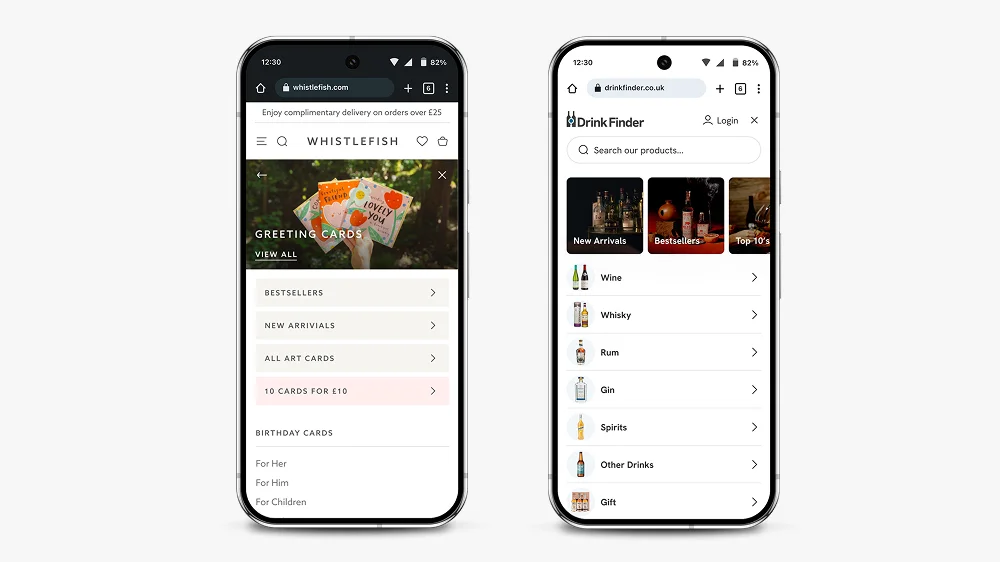
Navigation is one of the most important design decisions on a Shopify store, and one of the areas where themes most consistently let brands down.
Most premium themes look fine in the demo, with clean placeholder content and a handful of tidy category labels. Add real store content — longer collection names, multiple sub-categories, a mix of product types — and many theme navigation systems completely fall apart. The layouts break, the hierarchy becomes unclear, and the mobile experience in particular deteriorates quickly. This is one of the most common things I see when I start working with a store that has outgrown its theme.
The question to ask is simple: can someone who has never visited your store before find what they are looking for in two clicks? For most stores, the answer is no.
Good Shopify navigation in 2026 means thinking about multiple entry points. Some customers will land on your homepage and browse. Others will arrive on a product page from a Google search. Others will come from a paid social ad to a specific collection. Every one of those journeys needs to make sense independently.
A few principles that hold up consistently:
Bring your most important collections out of the burger menu and into the navigation bar. A hidden menu adds friction for customers who know what they want. On mobile especially, expanding a menu to find a category is a barrier that costs clicks.
Use your navigation hierarchy to guide rather than overwhelm. Three to five top-level items with clear sub-pages is almost always better than a flat list of twelve collections.
Search is often neglected but is one of the highest-intent actions a customer can take on your store. If you have more than 50 products, a well-designed search experience with intelligent results and suggested products will meaningfully improve conversion. Themes give you a functional search box. Bespoke design lets you think properly about what happens when a customer uses it.
For homeware and lifestyle stores, alternative navigation routes — shopping by room, by trend, by occasion — serve browsers rather than just researchers. More on how this affects collection and landing pages is in my article on what makes a good landing page.
4. Homepage Design
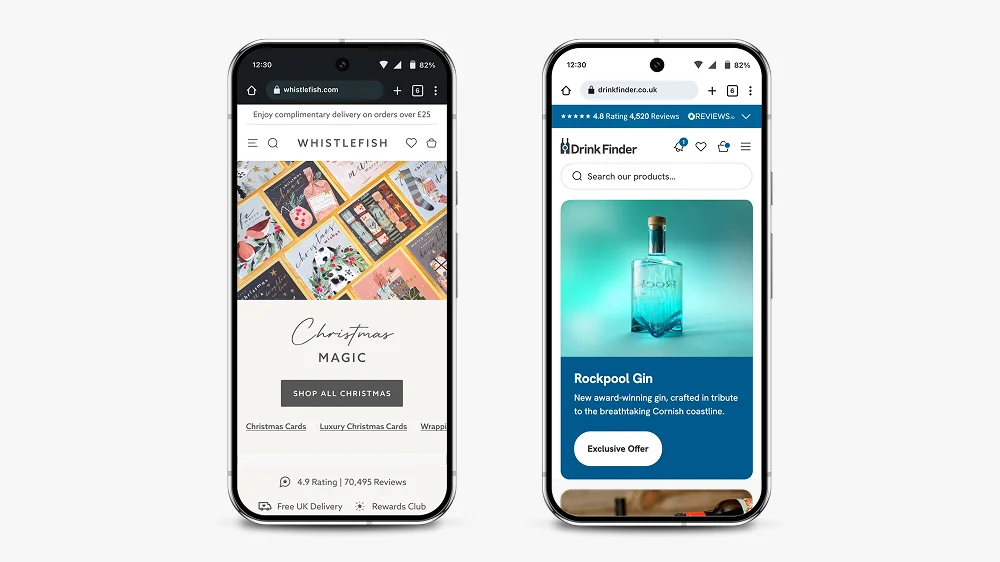
Your homepage is not a sales page. It is a trust-builder and a navigation tool.
That distinction matters. Too many Shopify homepages try to do everything at once: announce a sale, feature every collection, showcase press mentions, display reviews, and tell the brand story, all above the fold. The result is noise, and noise increases bounce rate.
The homepage has one job: give visitors enough to feel confident, then point them in the right direction.
In practice, that usually means a clear hero section with a single message and a single action, followed by your main navigation into collections, followed by social proof at the right point in the journey. It does not mean cramming every trust signal and product category onto the page before the customer has had a chance to decide if they are in the right place.
One thing I flag consistently when reviewing stores: the homepage is not the place for long service descriptions or detailed product copy. Those belong on collection and product pages. The homepage should function as an entry point that earns trust and creates momentum.
This is also relevant from an SEO perspective. If your homepage and your collection or service pages are competing for the same keywords and content territory, they will work against each other. Your homepage should be differentiated by intent, not just topic.
5. Product Page Design
Product pages are where conversion happens. If your homepage earns trust and your navigation creates momentum, your product pages need to close.
The fundamentals that consistently make a difference:
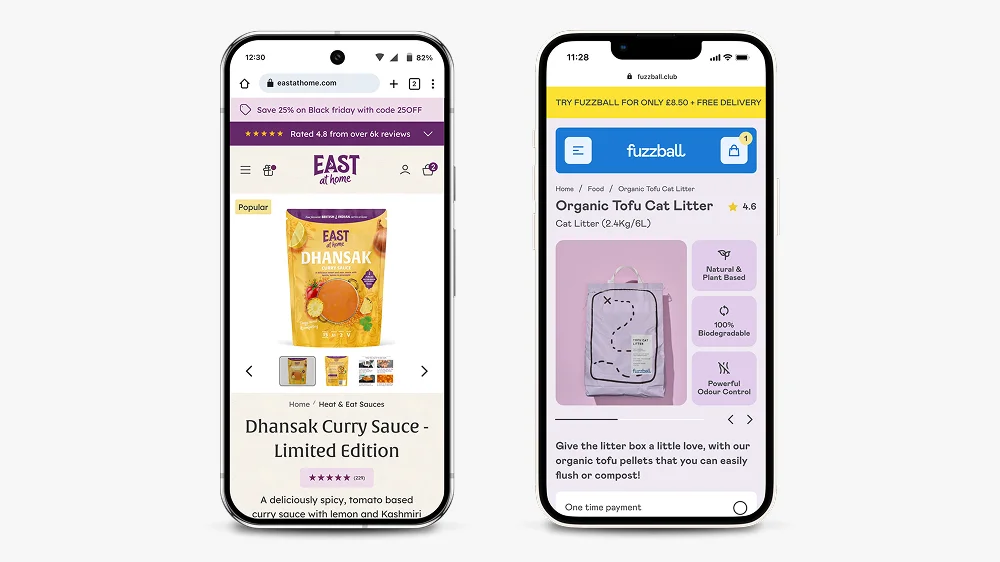
Hierarchy above the fold. On mobile, a customer should see the product image, product title, price, and a review score without needing to scroll. The add-to-cart button should be visible, ideally sticky on scroll. Everything else — the description, the specs, the shipping information — belongs below.
Benefits over features. Most product descriptions list what a product is rather than why someone should buy it. The difference matters. “100% merino wool” is a feature. “Stays warm without overheating, so you can wear it from morning to evening” is a benefit. For premium and lifestyle products, benefits-led copy commands higher prices and reduces hesitation.
Trust signals in the right places. Reviews, delivery information, and returns policies should appear close to the add-to-cart button. Not decoratively in the footer, not buried in an accordion. Customers have specific questions at the point of purchase and your page needs to answer them without making them go looking.
Thoughtful upselling. How related products are surfaced and how upsells are introduced depends entirely on your product type and how your customers think. A customer buying a consumable product thinks differently to someone buying a considered furniture purchase. A theme applies generic upsell logic regardless. Bespoke design maps this to your specific purchase journey, which is where the real gains in average order value come from.
The work I did on Zen Maitri’s product pages shows how hierarchy and trust signal placement translate directly into better performance. More detail on that, along with before and after screenshots, is in my conversion rate optimisation article.
6. Mobile-First Design
In 2026, designing for desktop first is not a mistake, it is a category error. More than 70% of Shopify traffic is mobile. Your store needs to be designed for a phone screen before anything else.
Mobile-first design is not the same as responsive design. Responsive design means a desktop layout that adapts to smaller screens. Mobile-first means starting with the constraints of a phone and working outward. The difference shows up in how navigation behaves, how product images scale, how much text appears before a scroll is required, and how buttons are sized and positioned.
A few things that separate genuinely mobile-first Shopify design from a desktop site that has been squeezed: sticky headers and add-to-cart buttons that do not obscure content; navigation that works with a thumb, not a cursor; images that load fast on mobile networks; collection pages where filtering does not require a full-screen takeover on every use.
I design in Figma at mobile size first, then scale up to desktop. This forces decisions that improve the experience across all devices rather than creating a desktop design and hoping it translates.
For more on how small design details affect the overall experience, my article on microinteractions in Shopify design covers the specific mechanics of why these details matter more than most people expect.
7. Editorial Sections and Landing Page Flexibility
This is an area that catches a lot of store owners off guard, and it is one of the places themes fall down most noticeably.
Most themes have limited editorial section templates, and many do not allow proper semantic heading structure — meaning you cannot control whether a section title renders as an H2, H3, or H4. That matters both for SEO and for building out the kind of content-rich landing pages that rank well and convert.
If you want to create campaign pages, seasonal landing pages, editorial content, or category pages that do more than list products, you quickly hit the ceiling of what most themes can do. The sections look fine in the demo but do not give you the flexibility to map out real content in a meaningful way.
In a bespoke build, every editorial component is designed intentionally. You know exactly what each section can contain, how headings are structured, and how content will render before a single line of code is written. This makes building out new landing pages straightforward rather than a workaround exercise.
For more on what goes into a well-structured Shopify landing page, see my article on what makes a good landing page.
8. Speed and Performance
A well-designed Shopify store that loads slowly will still underperform. A one-second delay in load time can reduce conversions by up to 20%.
Shopify handles a lot of performance optimisation at the platform level, but there are still decisions in the design and build process that affect speed significantly.
App overload is the most common culprit. Every app installed on a Shopify store adds code. Review your app list and remove anything you are not actively using. If you have three apps each doing a version of the same job, consolidate.
Image optimisation matters more than most people realise. Uncompressed images on product pages are one of the main reasons for slow load times on otherwise well-built stores. Use WebP format where possible and keep product images under 200KB without visible quality loss.
Theme code quality varies enormously. Run your store through Google’s PageSpeed Insights and Shopify’s own speed report regularly. If performance is consistently low despite clean images and a lean app stack, the theme code itself may be the issue.
9. When to Hire Someone Instead
A lot of store owners start designing their Shopify store themselves. That is completely reasonable, especially in the early stages. The problems usually start when they hit a wall — the theme will not do what they need, the navigation has broken under the weight of real content, the conversion rate is not improving despite changes, or they simply cannot get the store to look and feel the way they have in their head.
At that point, continuing to iterate without specialist help often costs more time and money than bringing someone in from the start would have.
There are a few specific situations where hiring a Shopify web designer is clearly the right call:
When you have outgrown your theme. If you are spending more time fighting the theme than building your store, it is time to think about a bespoke build. The signs are usually obvious: navigation that breaks with real content, editorial sections that will not do what you need, upsell and purchase journey logic that does not fit your product.
When you are in a competitive market. If your competitors have invested in good design and you have not, you are at a disadvantage that compounds over time. Customers make snap judgements. A store that looks generic next to a store that looks considered will almost always convert at a lower rate, regardless of product quality.
When your current store is not converting. If you are getting traffic but not sales, the answer is not more traffic, it is fixing the store. A designer with CRO experience will diagnose where people are dropping off and why, then make targeted changes rather than rebuilding things that are already working. My Shopify CRO service starts with an analytics review before touching anything.
When your brand needs to carry weight. For premium products, the store design is part of the product experience. If your price point requires trust and your store does not communicate that trust, you will underperform. This is particularly true for DTC brands where the store is the entire customer relationship.
When you have specific requirements. Subscription products, quiz flows, complex product variants, or custom purchase journeys require design thinking and platform knowledge that goes beyond what any theme can handle cleanly.
I work with brands across all of these situations. If you want to understand what that looks like in practice, my Shopify design services page covers how I approach projects, or you can browse the case studies directly.
Conclusion: What Good Shopify Design Actually Looks Like
Designing a Shopify website in 2026 means thinking clearly about strategy before touching a single section. It means making an honest decision about whether a theme or a bespoke build is right for where you are right now — and knowing that answer will likely change as your store grows. It means designing for mobile first, building product pages around the questions customers have at the point of purchase, and keeping performance front of mind throughout.
Good Shopify design should be invisible. When it works, customers do not notice the design. They just find what they need, feel confident, and buy. That is the goal.
If you have questions about your specific store or you are weighing up whether to design it yourself or bring someone in, take a look at my Shopify website design services or get in touch directly.
Frequently Asked Questions About Designing a Shopify Website
A DIY Shopify store using a theme can be set up in a few days, but designing it properly, with considered navigation, product pages, and mobile experience, typically takes several weeks. A professionally designed and built Shopify store from a specialist usually takes 6 to 12 weeks from kickoff to launch. Rushing the process almost always results in a store that needs expensive fixes post-launch.
No. Shopify’s theme editor and Shopify 2.0 sections mean you can do a great deal without touching code. More complex customisations, bespoke sections, or specific functionality will require a developer. If you are working with a designer who is not a developer, they will typically collaborate with a developer to handle the build side. I take this approach on all my projects, treating design and development as two distinct skills.
A theme is a pre-built template you customise to fit your brand. Bespoke design starts from scratch with your specific products, customers, and goals in mind. Themes are a smart choice when you are launching or testing — they are cheaper, faster, and can look excellent. The case for going bespoke comes when you have real data about your customers and their purchase journey, and you need the design to reflect that rather than work around a generic framework. My article on why off-the-shelf Shopify themes hold stores back covers where that line usually falls.
Clear hierarchy above the fold on mobile, benefits-led copy rather than feature lists, trust signals close to the add-to-cart button, fast load times, and upsells that are mapped to how your specific customers make decisions. The goal is to answer the questions a customer has at the point of purchase without making them go looking for the answers.
Mobile first, always. Over 70% of Shopify traffic is mobile. Designing for desktop and adapting to mobile typically produces an inferior mobile experience because you are working backwards from the wrong starting point. Start with the constraints of a phone screen and work outward from there.
Start with data rather than opinion. Use Google Analytics to see where people are dropping off. Use a tool like Hotjar to see how people are actually moving around your store. Then prioritise changes based on the biggest drop-off points. Often the biggest gains come from small, targeted improvements to product pages and checkout flow rather than a full redesign. My Shopify conversion rate optimisation service starts exactly this way.
Dawn, Shopify’s free theme, is a strong starting point for most stores. It is lightweight, fast, and built to Shopify’s current technical standards. Paid themes like Impulse, Motion, and Prestige suit specific aesthetics but each comes with trade-offs in code weight and flexibility — and all of them will show their limitations once real store content goes in. The best theme is the one that fits your product range and customer journey, not the one that looks most impressive with demo content.
Focus on simplicity and clarity. Use Dawn as your starting point. Keep your navigation to three to five top-level items. Design your product pages around the specific questions your customers have. Test your store on a real mobile device, not just a resized browser window. Use Shopify’s free analytics to monitor where people are dropping off. Most store owners manage well on a theme in the early stages — the wall usually appears when the store starts growing and the theme cannot flex to meet the real requirements of the business.
This article was written by Anthony Bliss, a Shopify Expert & Freelance Shopify Designer specialising in UX and UI design for DTC brands. With 20+ years of design experience and 6+ years focused exclusively on Shopify, Anthony helps brands create stores that convert.
Let’s create your Shopify success story
Shopify Success Stories
Shopify Migration with Custom & Conversion focussed UX
Drink Finder
Bespoke Shopify Subscription UX and UI and design system
Fuzzball
A fresh mobile-first design system and bespoke product page UX
Hartnack & Co
More Shopify Articles
What Is Generative Engine Optimisation (GEO) and Why Every Shopify Brand Needs It in 2026
Getting found online used to mean one thing: ranking on Google. That is still important. But a growing share of product discovery is now happening…
Shopify Agentic Commerce: What UK Brands Need to Know
The way people discover and buy products online is changing faster than at any point since mobile shopping took off. AI assistants are no longer just…
How to Design a Shopify Website in 2026 (And When to Hire Someone Instead)
Designing a Shopify website in 2026 is not the same as it was five years ago. The platform has matured, customer expectations have risen, and the gap…
Shopify Expert
Ready to elevate your store? Start your Shopify transformation today
Shopify expert who can help elevate your store to the next level
20 years of agency and direct client experience, without the high price tag
Network of the best developers, Klaviyo experts & SEO experts perfect for big projects
This site is protected by reCAPTCHA and the Google Privacy Policy and Terms of Service apply.
Get in touch
Registered in England & Wales No. 10575474. Based in Falmouth, Cornwall, UK.
Shopify Pricing 2026: What Does Shopify Actually Cost?
Introduction
In this guide I’m going to walk you through every cost involved in running a Shopify store in 2026. Not just the headline figures, but the transaction fees, the apps, the themes, and the things that tend to catch people out. By the end, you’ll have a realistic picture of what you’ll actually be paying, and how to keep costs down without compromising on your store.
I’m Anthony, a Freelance Shopify Designer based in Falmouth, Cornwall. Everything in this guide comes from real experience designing and optimising stores for UK brands, not just reading Shopify’s website.
The Shopify Plans: What You Get and What It Costs
Shopify currently offers five main plans. Here’s a clear breakdown of what each costs and who it’s designed for.
| Plan | Monthly | Annual (pm) | Trans. Fee* | Best For |
|---|---|---|---|---|
| Starter | £5/mo | £5/mo | 5% | Social selling only, no full storefront |
| Basic | £25/mo | £19/mo | 2% | New stores and small businesses |
| Shopify | £65/mo | £49/mo | 1% | Growing stores (most popular) |
| Advanced | £344/mo | £259/mo | 0.6% | Scaling stores needing advanced reporting |
| Plus | From £2,000/mo | From £2,000/mo | 0.2% | High-volume enterprise brands |
*Transaction fees only apply if you use a third-party payment gateway instead of Shopify Payments. More on that below.
You’ll save around 25% by paying annually rather than month-to-month, which is worth doing if you’re committed to the platform. For most small-to-medium UK stores, the Basic or Shopify plan is the right starting point. Don’t over-invest in a higher plan before your store needs it.
Which Plan Should You Actually Start On?
This is the question most guides avoid answering directly. Here’s my honest take based on what I see with clients:
- Just starting out: Begin on Basic. You get everything you need to launch and run a proper store. The reporting is limited but that’s fine when you’re still finding your feet. Upgrade when the revenue justifies it.
- Turning over £5,000 to £50,000 per month: The Shopify plan is worth it here. The lower transaction fees start to pay for the plan cost difference, and the professional reports become genuinely useful.
- Scaling fast or running multiple locations: Advanced is worth considering if you need detailed reporting, calculated shipping rates, or you’re managing a more complex operation.
- Enterprise level: Shopify Plus makes sense once you’re turning over £1 million or more annually, need custom checkout flows, or want B2B functionality built in. Read my full breakdown of Shopify vs Shopify Plus before making that call.
One thing I tell every client: don’t choose a plan based on features you might use one day. Start lean and upgrade when your store actually needs it.
Does Shopify Take a Cut of Your Sales?
This is one of the most searched questions about Shopify, and the answer is: it depends on how you take payments.
Shopify has its own payment processing system called Shopify Payments. If you use it, Shopify does not charge a transaction fee on top of your plan. You’ll pay a standard card processing rate, typically 1.5% to 2.2% plus 25p per transaction in the UK depending on your plan, but that’s just what payment processing costs. Every provider charges something similar.
If you prefer a third-party gateway such as Stripe, PayPal, or a buy now pay later provider, Shopify charges an additional transaction fee on top of whatever that gateway charges. That extra fee ranges from 0.6% to 2% depending on your plan.
The short answer: use Shopify Payments if you can. It simplifies your setup and eliminates the extra fee. For the vast majority of UK stores, it works perfectly well.
Shopify Payments vs Third-Party Gateways
Here’s a real-world example. On the Basic plan, turning over £20,000 a month:
- With Shopify Payments: you pay Shopify’s card rate (around 1.7% plus 25p per transaction). No additional Shopify fee on top.
- With Stripe: you pay Stripe’s rate (around 1.4% plus 20p for UK cards) plus Shopify’s 2% transaction fee. That’s roughly £400 extra per month.
- With PayPal: similar, PayPal’s processing fees plus Shopify’s transaction fee on top.
That £400 per month difference is significant. The main reason to choose a third-party gateway is if you need specific functionality, such as a particular BNPL provider, or a gateway Shopify Payments doesn’t support in your region. Otherwise, stick with Shopify Payments.
The Hidden Costs: What Shopify Doesn't Lead With
The plan fee is the easy part. Here’s where the real budgeting conversation starts.
Shopify Themes
Shopify has a handful of free themes that are perfectly functional for getting started. Most growing brands eventually move to a paid theme for more design flexibility, which typically costs £150 to £350 as a one-off purchase.
That said, it’s worth thinking carefully about whether a premium theme genuinely solves your problem. Off-the-shelf themes have real limits, which I’ve written about in detail in Why Off-the-Shelf Shopify Themes Hold Stores Back. For many brands, a bespoke Shopify build is a far better long-term investment.
Apps
This is where Shopify store costs can creep up. Shopify’s strength is its app ecosystem, but apps add up quickly. Here’s what to budget for a typical growing store:
- Email marketing (Klaviyo): free up to 250 contacts, then from around £20 per month scaling with your list. See my full Klaviyo pricing breakdown.
- Reviews (Judge.me or Okendo): Judge.me has a solid free plan. Okendo starts from around £19 per month for more advanced features.
- Subscriptions (Recharge or Seal Subscriptions): from £0 to £20 per month depending on volume. If subscriptions are central to your model, it’s worth getting the setup right from day one.
- Upsells and bundles: from £0 to £30 per month depending on the app.
- Loyalty programmes: Smile.io and similar, from £0 to £50 per month.
A lean but effective app stack for a growing store typically adds £40 to £100 per month on top of your plan. Don’t install apps you don’t need. They slow your store down and the costs stack up quickly.
Your Domain
If you buy your domain through Shopify, expect to pay around £10 to £20 per year for a .co.uk. You can also connect an existing domain from another registrar, which Shopify makes easy. Check Shopify’s domain search if you’re still deciding on a name.
Design and Development
If you’re building the store yourself, this cost is your time. If you’re working with a specialist, it’s a one-off project fee. As a Shopify Expert with 20 years of design experience, my bespoke store builds start from a fixed project fee. You get a store designed specifically for your brand and customers, not a template everyone else is using.
The upfront cost of a well-designed store pays for itself quickly. A 1% improvement in conversion rate on a £20,000 per month store is an extra £200 per month. Conversion rate optimisation is always worth the investment.
What Does a Shopify Store Actually Cost Per Month?
Here’s a realistic monthly cost breakdown for a growing UK DTC brand doing £20,000 per month in revenue, comparing the Basic and Shopify plans.
| Cost Item | Basic Plan | Shopify Plan |
|---|---|---|
| Monthly plan fee | £25 | £65 |
| Transaction fees (Shopify Payments) | £0 | £0 |
| Transaction fees (Stripe, on £20k/mo revenue) | ~£400 | ~£200 |
| Email marketing (Klaviyo, ~1,000 contacts) | ~£20 | ~£20 |
| Reviews app | £0 to £30 | £0 to £30 |
| Theme (amortised over 2 years) | ~£10 | ~£10 |
| Domain | ~£1 | ~£1 |
| Total with Shopify Payments | ~£56/mo | ~£96/mo |
| Total with Stripe | ~£456/mo | ~£296/mo |
The single biggest lever here is payment gateway choice. Using Shopify Payments instead of Stripe on the Basic plan saves around £400 per month at this revenue level, more than enough to cover a solid email marketing setup and still come out ahead.
On the Shopify plan with Shopify Payments, you get better reporting, lower card fees, and a platform that scales properly, for around £96 per month all-in. That’s genuinely good value.
Shopify vs Shopify Plus: When Does the Jump Make Sense?
Shopify Plus starts from around £2,000 per month and is built for high-volume enterprise stores. For most UK businesses, the standard Advanced plan is more than enough. The Plus jump is rarely worth it until you’re turning over £1 million or more annually and genuinely need custom checkout logic, B2B functionality, or a dedicated account manager.
I’ve covered this in detail in Shopify vs Shopify Plus: Which Is Right for Your Business?
Is Shopify Worth It? My Honest Take
After designing stores for clients ranging from independent Cornish brands to fast-growing DTC operations, my answer is consistently yes, but only if you approach it with a clear strategy.
Shopify’s real value isn’t in the pricing. It’s in the reliability, the ecosystem, the conversion-optimised checkout, and the speed at which you can build something genuinely world-class. Some of the biggest brands on the planet run on Shopify for good reason.
That said, the platform is only as good as the store built on it. I’ve seen businesses paying £65 per month and losing thousands every month to poor UX, slow page speeds, or a checkout that’s quietly losing customers. The monthly plan cost is almost irrelevant compared to what a well-built store can earn you.
Don’t just think about what Shopify costs. Think about what a well-built Shopify store can earn you. Getting it right from the start is almost always worth the investment.
Looking for a Shopify expert who knows the platform inside out and has happy clients to prove it? See how I design Shopify stores that convert.
Frequently Asked Questions About Shopify Pricing
Only if you use a third-party payment gateway. Use Shopify Payments and there’s no additional Shopify transaction fee. You just pay the standard card processing rate.
Yes, you can upgrade or downgrade at any time from your Shopify admin. Shopify adjusts billing pro-rata, so if you upgrade mid-cycle you only pay the difference for the remaining days. Most stores start on Basic and upgrade naturally as revenue grows.
Yes. There is no long-term contract on monthly plans. You can cancel from your store settings at any time and you will not be charged again after that billing period. If you are on an annual plan, Shopify does not offer refunds for unused months, so it is worth being confident in the platform before committing to a year upfront. Most people are.
Yes. Shopify currently offers a 3-day free trial, followed by a heavily discounted starter period. Check Shopify’s pricing page for the latest offer, as these change regularly.
Start on the Basic plan, use Shopify Payments, keep apps to the essentials, and register your domain externally. You can be live for under £30 per month in platform costs.
That depends on whether you’re building it yourself or working with a specialist. A bespoke store built by a Shopify Expert typically starts from a few thousand pounds as a one-off project fee. If you’d like to talk through your project, get in touch.
Plans range from £5 per month on the Starter plan to £344 per month on Advanced, when paying monthly. Annual billing brings those costs down by around 25%. Shopify Plus starts from around £2,000 per month for enterprise stores. Most UK small businesses start on the Basic plan at £25 per month.
For most new stores, start on Basic. If you’re turning over more than £50,000 per month or need professional reports and better shipping rates, move to the Shopify plan. The Advanced plan suits stores scaling fast and needing detailed analytics. If you’re unsure, get in touch and I’ll point you in the right direction.
This article was written by Anthony Bliss, a Shopify Expert & Freelance Shopify Designer specialising in UX and UI design for DTC brands. With 20+ years of design experience and 6+ years focused exclusively on Shopify, Anthony helps brands create stores that convert.
Let’s create your Shopify success story
Shopify Success Stories
Shopify Migration with Custom & Conversion focussed UX
Drink Finder
Bespoke Shopify Subscription UX and UI and design system
Fuzzball
A fresh mobile-first design system and bespoke product page UX
Hartnack & Co
More Shopify Articles
What Is Generative Engine Optimisation (GEO) and Why Every Shopify Brand Needs It in 2026
Getting found online used to mean one thing: ranking on Google. That is still important. But a growing share of product discovery is now happening…
Shopify Agentic Commerce: What UK Brands Need to Know
The way people discover and buy products online is changing faster than at any point since mobile shopping took off. AI assistants are no longer just…
How to Design a Shopify Website in 2026 (And When to Hire Someone Instead)
Designing a Shopify website in 2026 is not the same as it was five years ago. The platform has matured, customer expectations have risen, and the gap…
Shopify Expert
Ready to elevate your store? Start your Shopify transformation today
Shopify expert who can help elevate your store to the next level
20 years of agency and direct client experience, without the high price tag
Network of the best developers, Klaviyo experts & SEO experts perfect for big projects
This site is protected by reCAPTCHA and the Google Privacy Policy and Terms of Service apply.
Get in touch
Registered in England & Wales No. 10575474. Based in Falmouth, Cornwall, UK.

What DTC Brands Should Look for in a Shopify Designer
Introduction
As a Shopify Expert working exclusively with DTC brands, I’ve seen this pattern repeatedly. But most Shopify designers don’t understand DTC. They treat every store the same, whether it’s a marketplace, a wholesale operation, or a brand selling direct. That doesn’t work for DTC, where margins are tight and every percentage point in conversion matters. Here’s what actually separates a good DTC Shopify designer from someone who’ll build you a pretty site that doesn’t sell.
Why DTC Brands Need a Different Approach to Shopify Design
Direct-to-consumer isn’t just ecommerce with better branding. The business model changes what your store needs to do:
Customer Acquisition Cost
You’re paying for every customer through paid ads, content marketing, or influencer partnerships. Traditional retailers might get foot traffic or marketplace visibility. You don’t. That means your store has to convert at a higher rate just to stay profitable. Every design decision should reduce friction and increase conversion.
Lifetime Value Over One-Time Sales
DTC brands win on repeat purchases. Your store needs to collect emails, encourage subscriptions, and make reordering effortless. A designer who doesn’t understand this will focus on first-time conversion and ignore retention mechanics.
Brand Control
You own the customer relationship. That means your store is your brand. Design isn’t just aesthetics. It’s how customers perceive quality, trust, and value. Generic Shopify themes or cookie-cutter designs kill that perception. You need a designer who understands brand expression through UX, not just visual design.
Conversion-Focused Design Over Aesthetic Design
Most designers prioritise how a site looks. DTC designers prioritise how it performs. Good design should be invisible. If customers notice your design before they add to cart, something’s wrong.
What Conversion-Focused Design Actually Means
- Clear product value propositions above the fold
- Frictionless add-to-cart and checkout flows
- Trust signals placed where they matter (not decoratively)
- Mobile-first design (60-70% of DTC traffic is mobile)
- Fast load times (every 100ms delay costs conversion)
- Strategic use of scarcity and urgency (not fake countdown timers)
A designer focused on conversion will ask about your average order value, cart abandonment rate, and current conversion metrics before they talk about fonts or colours. If you want to understand why human-led conversion thinking matters so much, read this piece on why conversion rate optimisation is still a human skill. If they don’t ask these questions, they’re not the right fit for DTC.
Real Examples: Conversion-Focused Design for DTC Brands
Here are two DTC brands I’ve worked with, showing how conversion-focused design translates to measurable results:
Fuzzball: DTC Cat Food Subscription Brand

For Fuzzball, a DTC cat food subscription brand, I designed the entire store with conversion and retention as primary goals. The challenge was balancing brand personality (fun, approachable) with the serious UX required for subscription products.
What I focused on:
- Custom quiz flow to match cats with the right food (personalisation increases conversion)
- Clear subscription value proposition above the fold
- Frictionless subscription signup (not buried in product page complexity)
- Mobile-first product pages (the majority of cat food buyers browse on mobile)
- Seamless quiz-to-checkout journey with optimised conversion points
Results:
+86% increase in quiz summary page to checkout conversion
+62.5% increase in overall site purchase conversion rate
Eat at Home: British Indian Restaurant style curries at home.

For Eat at Home, a British Indian meal kit brand, the conversion challenge was different. Meal kits compete on convenience and value, so the store needed to make ordering feel effortless while justifying the price point through quality signals.
Key conversion elements:
- High-converting newsletter signup (clear value: 10% off + free recipe ebook)
- Product photography and descriptions focused on meal quality and authenticity
- Simplified basket and checkout flow (reducing decision fatigue)
- Strategic trust signals (delivery information, ingredient sourcing)
- Mobile-optimised experience for browsing and ordering
Results:
+26% increase in revenue per session
+178% increase in overall revenue growth
+16% increase in average basket value
This is what conversion-focused design looks like: understanding the specific barriers for your product type and DTC business model, and then systematically removing them through UX decisions that directly impact revenue.
UX and UI: Why You Need Both
User Experience (UX) and User Interface (UI) are different skills. You need a designer who can do both or who partners with someone who can.
UX: Making It Work
UX is the flow. How do customers move from landing page to checkout? Where do they get stuck? What questions do they have at each stage? A good UX designer maps customer journeys, identifies friction points, and designs solutions. For DTC, this means understanding why someone abandons cart, how to reduce decision fatigue, and when to introduce trust signals.
UI: Making It Look Right
UI is the visual layer. Colours, typography, spacing, and button styles. This is where brand expression happens. A strong UI designer makes your store feel premium, trustworthy, and aligned with your brand identity. For DTC, UI communicates quality and justifies price points.
Many designers are strong in one area but weak in another. You need both. A beautiful site with broken UX won’t convert. A functional site with weak UI won’t build brand equity. Ask any designer you’re considering: show me examples of both your UX work (flows, wireframes, problem-solving) and UI work (visual design, branding). If they can’t clearly separate the two, they probably don’t excel at both.
Shopify-Specific Technical Knowledge Matters
Shopify has constraints. A designer who knows the platform can work within them efficiently. One who doesn’t will promise things that can’t be delivered or require expensive workarounds.
What Shopify Knowledge Looks Like
- Understanding Shopify 2.0 sections and blocks
- Knowing when to use apps vs custom code
- Experience with Shopify’s checkout limitations and extensions
- Understanding Liquid templating and Shopify’s theming structure
- Knowledge of Shopify’s product variant limits and workarounds
- Experience integrating subscription apps (ReCharge, Recharge, Appstle)
Ask potential designers: what’s a recent Shopify limitation you ran into, and how did you solve it? Their answer will tell you immediately if they know the platform or if they’re learning on your dime.
How to Review a Designer's Portfolio for DTC Fit
Don’t just look at pretty screenshots. Visit the actual stores. Test them like a customer.
Questions to Ask When Reviewing Portfolio Work
- Are these DTC brands or other business models? DTC experience matters.
- Can I actually visit these stores, or are they just mockups?
- How does the mobile experience feel? (Test on your phone, not just resize your browser)
- Is the add-to-cart process smooth? Any unnecessary steps?
- Do product pages answer the questions I’d have as a buyer?
- Are there clear trust signals (reviews, shipping info, guarantees)?
- Does the site load fast, or does it feel sluggish?
If their portfolio shows one beautiful hero image per project but you can’t actually use the stores, that’s a red flag. You need working examples, not gallery pieces.
Red Flags When Hiring a Shopify Designer for Your DTC Brand
Watch for these warning signs:
- They talk only about aesthetics – If the conversation is all fonts, colours, and trends, they’re not focused on conversion.
- No questions about your metrics – A good designer asks about current conversion rates, AOV, traffic sources, and customer behaviour before proposing anything.
- Portfolio is all different platforms – Shopify specialists should have mostly Shopify work. If they jump between WordPress, Wix, and Shopify, they’re generalists, not specialists.
- They promise custom checkout on standard Shopify – Shopify locks down checkout unless you’re on Shopify Plus. If they claim otherwise, they don’t understand the platform.
- Timeline seems too fast – A proper DTC store takes 6-12 weeks minimum. Anyone promising 2-3 weeks is cutting corners or templating your site.
- No mention of testing or iteration – Conversion optimisation is ongoing. A designer who thinks they’ll nail it perfectly on launch day doesn’t understand DTC.
Questions to Ask Before Hiring a Shopify Designer
These questions will quickly reveal if someone understands DTC:
- What’s your process for understanding our target customer before designing anything?
- Can you show me examples of DTC Shopify stores you’ve designed? (Not just any Shopify stores)
- How do you approach mobile design differently from desktop?
- What metrics do you track to measure if a design is successful?
- How do you handle subscription products in Shopify?
- What’s your approach to site speed and performance optimisation?
- How do you balance brand expression with conversion optimisation?
What a Successful Shopify Designer Relationship Looks Like
You’ll know you’ve hired the right designer when:
- They challenge your assumptions about what customers want
- They propose solutions you hadn’t considered
- They explain trade-offs clearly (speed vs features, brand vs conversion)
- They show you data or examples to support their recommendations
- They’re comfortable saying ‘I don’t know, let me research that’
- They care as much about post-launch performance as pre-launch perfection
Conclusion: The Bottom Line on Hiring a Shopify Designer for DTC
DTC brands need designers who understand conversion, not just aesthetics. You need someone who can balance brand expression with performance optimisation. Someone who knows Shopify’s technical constraints and can work within them efficiently. Someone who asks about metrics before colours.
Look for portfolio work with real DTC brands. Ask about UX process, not just visual outcomes. Verify Shopify expertise with specific technical questions. And recognise that a skilled freelancer often delivers better value than an agency, especially in the early stages of your brand.
Your Shopify store is your primary sales channel. The designer you hire directly impacts revenue. Choose based on expertise, not price. Choose based on process, not portfolio aesthetics. Choose someone who understands that for DTC brands, every percentage point in conversion rate matters. For a broader guide to the hiring process, read what to look for when hiring a Shopify designer.
Looking for a Shopify designer who understands DTC conversion and brand-building? See how I help DTC brands design stores that convert.
Frequently Asked Questions About Hiring Shopify Designers for DTC Brands
A DTC-specialised designer understands the unique economics of direct-to-consumer brands: high customer acquisition costs, the importance of lifetime value over single transactions, and the need for conversion rates that justify paid advertising spend. They focus on retention mechanics (subscriptions, reorder flows, email capture) and understand how to balance brand expression with performance. Regular Shopify designers might create beautiful stores, but without understanding DTC metrics, those stores often underperform.
For most DTC brands under £5M in revenue, a skilled freelance designer offers better value. You get direct communication, faster decision-making, lower costs, and often higher quality because you’re working with the actual person doing the design work, not a junior designer managed by an account person. Agencies make sense when you need a full team (development, marketing, strategy) simultaneously or when you’re at scale and need guaranteed availability.
Quality DTC Shopify design typically ranges from £8,000-£25,000 for a complete store build, depending on complexity, custom features, and the designer’s experience. Anything significantly cheaper likely means templates, junior designers, or offshore work with quality issues. Anything significantly more expensive is usually agency pricing with overhead. Remember that your store directly impacts revenue, so this is an investment, not an expense.
A proper DTC store build takes 6-12 weeks from kickoff to launch. This includes discovery, UX planning, design, development, testing, and content population. Anyone promising 2-3 weeks is either using templates (which kills differentiation) or cutting corners. Rushing this process almost always results in a store that needs expensive fixes post-launch. Factor in time for revisions and testing.
Ask: Can you show me 3-5 DTC stores you’ve designed (not just any ecommerce)? What conversion rates did they achieve? How do you approach customer retention design? What metrics do you track post-launch? How do you handle subscription products? What’s your process for understanding our target customer? Their answers will quickly reveal if they understand DTC or if they’re learning on your budget.
Yes. UX (user experience) determines how your store works and flows. UI (user interface) determines how it looks and feels. You need both. A beautiful site with broken UX won’t convert. A functional site with weak UI won’t build brand equity or command premium prices. Make sure your designer has demonstrated competence in both areas, not just visual design.
They should understand Shopify 2.0 sections and blocks, know when to use apps versus custom code, understand checkout limitations and extensions, have experience with Liquid templating, know product variant constraints, and understand subscription app integration. Ask them about a recent technical limitation they encountered and how they solved it. Their answer reveals their depth of platform knowledge.
It depends on project complexity. Some designers can handle Shopify development (theme customisation, Liquid work, basic apps). For simple builds, this can work well and keeps communication clean. For complex builds with custom features, advanced checkout modifications, or heavy technical requirements, you might need a separate developer. Ask upfront what’s included and where their technical limits are. I always see design and development as 2 different skills and mindsets. I wouldn’t hire a plumber to do an electrician’s job.
Visit the actual live stores, not just screenshots. Ask specific questions about their role (Did you do UX, UI, development, or all three?). Ask about challenges they faced on specific projects and how they solved them. Real designers can talk in detail about their process, decisions, and outcomes. Fake portfolios crumble under specific questioning.
Clarify this upfront. Most designers include a period of post-launch support for bug fixes and minor adjustments (typically 2-4 weeks). Ongoing design updates, new features, or conversion optimisation work usually requires a separate arrangement (monthly retainer or project-based). Make sure you understand what’s included in the initial scope versus what costs extra. Good designers stay available for their clients even after launch.
This article was written by Anthony Bliss, a Shopify Expert & Freelance Shopify Designer specialising in UX and UI design for DTC brands. With 20+ years of design experience and 6+ years focused exclusively on Shopify, Anthony helps brands create stores that convert.
Let’s create your Shopify success story
Shopify Success Stories
Shopify Migration with Custom & Conversion focussed UX
Drink Finder
Bespoke Shopify Subscription UX and UI and design system
Fuzzball
A fresh mobile-first design system and bespoke product page UX
Hartnack & Co
More Shopify Articles
What Is Generative Engine Optimisation (GEO) and Why Every Shopify Brand Needs It in 2026
Getting found online used to mean one thing: ranking on Google. That is still important. But a growing share of product discovery is now happening…
Shopify Agentic Commerce: What UK Brands Need to Know
The way people discover and buy products online is changing faster than at any point since mobile shopping took off. AI assistants are no longer just…
How to Design a Shopify Website in 2026 (And When to Hire Someone Instead)
Designing a Shopify website in 2026 is not the same as it was five years ago. The platform has matured, customer expectations have risen, and the gap…
Shopify Expert
Ready to elevate your store? Start your Shopify transformation today
Shopify expert who can help elevate your store to the next level
20 years of agency and direct client experience, without the high price tag
Network of the best developers, Klaviyo experts & SEO experts perfect for big projects
This site is protected by reCAPTCHA and the Google Privacy Policy and Terms of Service apply.
Get in touch
Registered in England & Wales No. 10575474. Based in Falmouth, Cornwall, UK.
What is a Shopify Partner? (And Why It Matters in 2026)
Introduction
As a Shopify Expert who works with clients on the platform daily, I’ve worked alongside Partners, learned the ecosystem, and seen the difference it makes. The Partner designation is more than just a badge. It signals legitimacy, ongoing training, and direct access to Shopify’s support network. But not all Partners are created equal, and the designation alone doesn’t guarantee quality work. Here’s what you actually need to know.
What is a Shopify Partner?
A Shopify Partner is someone (or a company) officially recognized by Shopify to work with the platform. Partners get access to tools, resources, and support that regular users don’t. They’re vetted by Shopify and have to meet certain standards to maintain their status.
The Partner program is free to join, but not everyone gets approved. Shopify checks your experience, your portfolio, and your business model. Once accepted, Partners get access to development stores, beta features, educational resources, and a direct support line to Shopify’s team. You can verify any Partner through Shopify’s Partner Directory.
Types of Shopify Partners
Not all Shopify Partners do the same thing. The program covers different specializations:
Service Partners (Designers, Developers, Agencies)
These are freelancers and agencies who build, design, and optimize Shopify stores for clients. This is the most common type and includes designers, developers, and full-service agencies. Service Partners work directly with store owners to create custom solutions, migrations, and ongoing support.
App Partners (App Developers)
App Partners create and sell apps in the Shopify App Store. If you’ve ever installed an app for subscriptions, email marketing, or reviews, it was built by an App Partner. They maintain and update these tools for thousands of stores.
Theme Partners (Theme Developers)
Theme Partners design and sell themes in the Shopify Theme Store. These are the pre-built templates you can purchase and customize. Theme Partners follow Shopify’s technical requirements and design standards, which are quite strict.
What Shopify Partners Get Access To
Being a Partner means more than a title. Here’s what Shopify provides:
Development Stores
Partners can create unlimited free development stores to build and test client projects. These stores have full functionality without needing to pay a monthly subscription until they go live. This lets Partners prototype designs, test apps, and build stores properly before launch.
Partner Dashboard
A centralized hub for managing all client stores, tracking development progress, and accessing Shopify’s educational resources. Partners can see performance metrics, manage billing relationships, and handle multiple stores from one interface. Access the Partner Dashboard here.
Early Access to Features
Partners get beta access to new Shopify features before public release. This means they can test updates, understand changes, and prepare client stores ahead of time. When Shopify 2.0 launched, Partners had months to learn the new system before it went live for everyone.
Educational Resources and Training
Free courses, certification programs, webinars, and documentation. Shopify regularly updates Partners on best practices, technical changes, and platform updates through the Shopify Academy. Partners who stay current with this training are more valuable to clients because they understand the platform deeply.
Priority Support
Direct access to Shopify’s support team via dedicated Partner channels. When a client issue needs urgent resolution, Partners can escalate faster than regular store owners. This is especially valuable during launches, migrations, or technical troubleshooting.
Why Working With a Shopify Partner Matters for Your Store
The Partner badge itself doesn’t guarantee quality, but it does indicate someone who:
- Has been vetted by Shopify (not just anyone can join)
- Stays updated with platform changes through ongoing training
- Has access to support channels you don’t as a store owner
- Can build and test your store properly using development environments
- Understands Shopify’s technical requirements and best practices
More importantly, Partners typically work on Shopify full-time or as a core part of their business. Someone doing Shopify design on the side isn’t likely to maintain Partner status or keep up with platform changes. The Partner program encourages specialisation and expertise.
If you’re not sure what else to look for beyond Partner status, here’s a full guide to hiring a Shopify designer in 2026.
How to Verify Someone is a Shopify Partner
Anyone can claim to be a Shopify Partner, but verification is easy:
Ask for Their Partner Page
Legitimate Partners have a profile in the Shopify Partner Directory. Ask them to send you the link. If they hesitate or can’t provide it, that’s a red flag.
Check Their Portfolio
Partners should have case studies or examples of Shopify stores they’ve built. Look for live stores, not just design mockups. Visit the sites, check if they’re actually on Shopify, and see if they function well.
Look for Shopify Badges
Many Partners display the Shopify Partner badge on their website. This is standard practice and easy to verify. However, don’t rely solely on badges. Anyone can put an image on their site. Always cross-check with the official directory.
Shopify Partner vs Non-Partner: What's the Difference?
Here’s what changes when you work with a certified Partner versus someone who isn’t:
Development Environment
Partners build your store in a proper development environment before going live. Non-Partners often build directly on your live store or use workarounds that aren’t ideal. This increases the risk of errors, downtime, and a messy launch process.
Platform Knowledge
Partners have access to ongoing training and updates directly from Shopify. Non-Partners rely on public information, forums, and outdated tutorials. When Shopify releases major updates (like Checkout Extensibility or Shopify Functions), Partners learn about them first and understand how to implement them properly.
Support Access
If something breaks or needs urgent troubleshooting, Partners can escalate to Shopify’s support team directly. Non-Partners have to go through standard support channels, which can take longer and may not get the same level of technical assistance.
Accountability
Partners have a reputation to maintain with Shopify. If they consistently deliver poor work or violate Shopify’s terms, they risk losing their Partner status. Non-Partners have no such accountability. This doesn’t mean every Partner is great, but there’s at least a formal relationship and standards to uphold.
Red Flags When Hiring Someone Who Claims to be a Shopify Partner
Even if someone is a Partner, watch for these warning signs:
- They can’t or won’t share their Partner page – Every Partner has a public profile. If they dodge this request, they’re probably not a Partner.
- No Shopify-specific portfolio – Shopify design is different from WordPress or Wix. If their portfolio is mostly other platforms, they’re not specialists.
- Vague about their process – Partners understand development stores, theme customization, and app integration. If they can’t explain their workflow clearly, that’s concerning.
- Promises features Shopify doesn’t support – Shopify has limitations. If someone guarantees something that sounds too good to be true (like unlimited product variants or custom checkout pages on standard plans), they don’t understand the platform.
- They’re overly reliant on apps – Good Partners know when to use apps and when to build custom solutions. If their answer to every requirement is ‘there’s an app for that,’ they might lack technical depth.
The Partner Badge Doesn't Guarantee Quality
Being a Shopify Partner is a baseline, not a ceiling. The program has different tiers (Member, Partner, Expert, Plus Partner), and requirements vary. Some Partners specialise in migrations, others in design, others in development. Some work with massive brands, others with small startups.
What matters more than the badge itself:
- Their actual portfolio and case studies
- Client testimonials and reviews
- How well they understand your specific business needs
- Their communication style and process transparency
- Whether they specialise in your industry or store type
Use the Partner status as a filter, not a final decision. It confirms they’re legitimate and have access to the right tools, but you still need to evaluate their actual work and fit for your project.
Questions to Ask When Hiring a Shopify Partner
Before committing to any Partner, ask:
- Can you show me your Partner page and portfolio of Shopify stores?
- How long have you been a Shopify Partner?
- What’s your process for building or optimizing a store?
- Do you specialize in any particular industry or store type?
- What happens if something breaks after launch?
- How do you handle ongoing support and maintenance?
- Can you provide references from previous Shopify clients?
Conclusion: The Bottom Line on Shopify Partners
A Shopify Partner is someone officially recognized by Shopify to work with the platform. They get access to development tools, training, support, and early feature access that non-Partners don’t. This makes them better equipped to build, optimize, and maintain Shopify stores.
The Partner badge is a good starting filter when hiring. It confirms legitimacy, ongoing education, and platform expertise. But it’s not a guarantee of quality. You still need to evaluate their portfolio, process, and fit for your specific needs.
Always verify Partner status through Shopify’s official directory. Ask for case studies. Check references. And make sure they specialize in what you actually need, whether that’s design, development, migration, or optimization.
Working with a qualified Shopify Partner means working with someone who understands the platform deeply, stays current with changes, and has the support network to handle complex projects properly. For most store owners, that peace of mind is worth prioritizing.
Looking to work with a Shopify specialist who understands design, UX, and the platform ecosystem?
See how I create conversion-focused Shopify stores that combine design expertise with deep platform knowledge.
Frequently Asked Questions About Shopify Partners
Yes, the Shopify Partner program is completely free to join. There are no upfront fees or monthly costs. However, Shopify does review applications and not everyone is automatically accepted. You need to demonstrate relevant experience and have a legitimate business purpose for joining.
Shopify Plus Partners are certified to work specifically with Shopify Plus (Shopify’s enterprise-level platform). They have additional training, higher standards, and experience handling large-scale, high-volume stores. Regular Partners can work with standard Shopify plans. If you’re on Shopify Plus or considering it, look for a Plus Partner specifically.
No, you can build a Shopify store yourself or hire anyone you want. The Partner designation isn’t mandatory. However, working with a Partner gives you access to someone who has proper development tools, ongoing training, and direct support from Shopify. For custom builds, migrations, or complex stores, a Partner is usually the safer choice.
Check the official Shopify Partner Directory. Every legitimate Partner has a profile there. Ask the person or agency for their Partner page link. If they can’t provide it or make excuses, they’re likely not a Partner.
Not necessarily. Pricing depends on experience, location, and project scope, not Partner status. Some Partners charge premium rates because of their expertise and track record. Others are competitively priced. What you’re paying for is access to someone with proper tools, ongoing training, and platform expertise. That often saves money in the long run by avoiding costly mistakes.
Shopify Partners provide services related to the Shopify platform. This includes designing and building stores, developing custom apps, creating themes, managing migrations from other platforms, optimizing existing stores for conversion, and providing ongoing support and maintenance. The specific services vary depending on whether they’re a designer, developer, or agency.
No. Partners need you to grant them access through collaborator permissions or staff accounts. You control what level of access they have and can revoke it anytime. Partners cannot access your store, customer data, or settings without your explicit permission. Always review what permissions you’re granting before approving access.
Yes, Partners can earn revenue share from Shopify for stores they build or manage. When a Partner-built store pays monthly subscription fees, the Partner receives a percentage. This creates an incentive for Partners to build successful, long-lasting stores. However, this doesn’t affect what you pay. Your Shopify subscription costs the same whether you work with a Partner or not.
Not necessarily, but location can matter for communication, timezone overlap, and understanding of local markets. UK-based Partners understand UK payment methods, GDPR compliance, and British customer expectations better than someone unfamiliar with the market. However, many Partners work successfully with international clients. What matters most is their expertise, portfolio, and communication style.
The terms are often used interchangeably, but technically Shopify Expert was the old name for what’s now called Shopify Partner. The Expert designation is still used informally and appears in some parts of Shopify’s ecosystem (like the Expert Marketplace), but the official program is now the Shopify Partner Program. If someone says they’re a Shopify Expert, ask if they’re an official Partner and verify through the directory.
This article was written by Anthony Bliss, a Shopify Expert & Freelance Shopify Designer specialising in UX and UI design for DTC brands. With 20+ years of design experience and 6+ years focused exclusively on Shopify, Anthony helps brands create stores that convert.
Let’s create your Shopify success story
Shopify Success Stories
Shopify Migration with Custom & Conversion focussed UX
Drink Finder
Bespoke Shopify Subscription UX and UI and design system
Fuzzball
A fresh mobile-first design system and bespoke product page UX
Hartnack & Co
More Shopify Articles
What Is Generative Engine Optimisation (GEO) and Why Every Shopify Brand Needs It in 2026
Getting found online used to mean one thing: ranking on Google. That is still important. But a growing share of product discovery is now happening…
Shopify Agentic Commerce: What UK Brands Need to Know
The way people discover and buy products online is changing faster than at any point since mobile shopping took off. AI assistants are no longer just…
How to Design a Shopify Website in 2026 (And When to Hire Someone Instead)
Designing a Shopify website in 2026 is not the same as it was five years ago. The platform has matured, customer expectations have risen, and the gap…
Shopify Expert
Ready to elevate your store? Start your Shopify transformation today
Shopify expert who can help elevate your store to the next level
20 years of agency and direct client experience, without the high price tag
Network of the best developers, Klaviyo experts & SEO experts perfect for big projects
This site is protected by reCAPTCHA and the Google Privacy Policy and Terms of Service apply.
Get in touch
Registered in England & Wales No. 10575474. Based in Falmouth, Cornwall, UK.
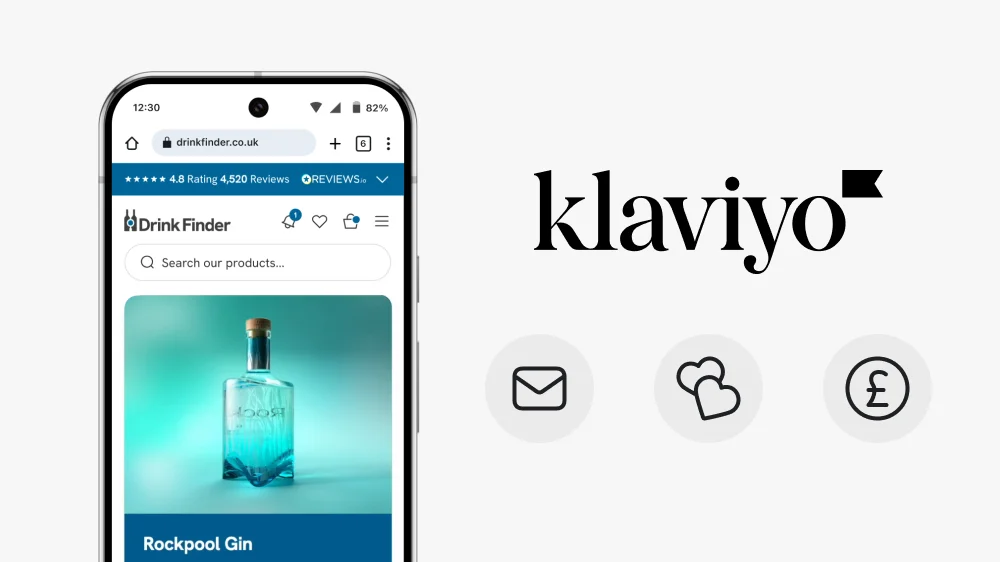
Klaviyo Pricing 2026: Complete Breakdown for Shopify Stores
Introduction
I’ve designed and integrated Klaviyo into dozens of Shopify stores, from back in stock notifications to newsletter signups. I’ve seen brands get caught off guard by unexpected costs, and I’ve also seen stores get incredible ROI when they use Klaviyo properly. Here’s everything you need to know about Klaviyo pricing in 2026.
How Klaviyo Pricing Works
Klaviyo charges based on the number of contacts in your account, not how many emails you send. This is different from platforms like Mailchimp that charge per email or per send.
A contact is anyone on your email or SMS list. This includes subscribers, customers, and anyone who’s given you their contact information. Even if they’re not actively engaged, they count toward your total.
The key thing to understand is that as your list grows, your costs increase. This makes sense because the value you’re getting increases too, but it’s important to plan for this growth in your budget. Klaviyo publishes their official pricing calculator which updates in real-time based on your contact count.
Klaviyo Pricing Tiers 2026
Free Plan (Up to 250 Contacts)
Klaviyo offers a free plan up to 250 contacts. This is perfect for:
- Brand new Shopify stores just starting out
- Testing Klaviyo before committing
- Learning the platform and building your first flows
The free plan includes email campaigns, basic automation flows (like abandoned cart and welcome series), and full Shopify integration. You can send up to 500 emails per month. It’s limited, but it’s enough to see if Klaviyo works for your store and start collecting subscribers.
Email Plans (Starting at 251 Contacts)
Once you go over 250 contacts, you’ll need a paid plan. Pricing scales with your list size:
Approximate pricing breakdown (UK pricing in £):
- 251-500 contacts: Around £20-30/month
- 501-1,000 contacts: Around £35-45/month
- 1,001-2,500 contacts: Around £55-75/month
- 2,501-5,000 contacts: Around £100-140/month
- 5,001-10,000 contacts: Around £170-230/month
- 10,000+ contacts: Custom pricing based on your list size
Note: Klaviyo pricing changes regularly based on features and market conditions. These are approximate ranges based on February 2026 data. For exact current pricing, always use Klaviyo’s pricing calculator to get a quote specific to your needs.
SMS Pricing (Separate from Email)
SMS is charged separately and works differently. You pay for SMS credits, with pricing based on:
- Number of SMS segments sent (a segment is roughly 160 characters)
- Which country you’re sending to
- Whether it’s a US, UK, or international number
In the UK, expect to pay around £0.03-0.05 per SMS segment. For most Shopify stores starting with SMS, budget £50-100/month for testing, then scale based on what works. SMS has higher engagement rates than email but also higher costs per message, so test carefully. Klaviyo’s SMS pricing documentation breaks down the costs by country.
What You Actually Get With Klaviyo
All paid plans include:
- Unlimited email sends (no per-email charges)
- Advanced segmentation and targeting based on behavior
- Pre-built automation flows (abandoned cart, welcome series, post-purchase, browse abandonment)
- A/B testing for subject lines, content, and send times
- Deep Shopify integration (syncs orders, products, customer data in real-time)
- Predictive analytics (lifetime value, churn risk, next order date)
- Email and chat support
- Detailed analytics and revenue attribution
Real Klaviyo Integrations: Examples from Shopify Stores
Understanding pricing is one thing, but seeing how Klaviyo actually works on Shopify stores makes the value clearer. Here are two examples from stores I’ve worked on.
Back in Stock Notifications: Drink Finder

For Drink Finder, a premium drinks retailer, I designed a custom back in stock notification system integrated with Klaviyo. When products sell out (which happens frequently with limited-edition spirits), customers can sign up to be notified when items return to stock.
How it works:
- Customer clicks ‘Notify Me’ on an out-of-stock product
- Klaviyo captures their email and the specific product they want
- When inventory is restocked, Klaviyo automatically sends a targeted email
- The email includes product details and a direct link to purchase
This single automation captures lost sales and converts interested browsers into buyers. The UI design focused on making the signup process seamless. No popup forms or multiple steps. Just a clean button that works. Klaviyo’s back in stock flow handles the automation, but the UX design determines whether people actually sign up.
Newsletter Signups: Converting Browsers to Subscribers
For Eat at Home, a British Indian restaurant meal kit brand, I designed a newsletter signup that makes the value crystal clear. Instead of a generic “sign up for updates” form, the design leads with benefits that matter to their customers.
The three-benefit approach:
- 10% off your first order (immediate value)
- Free BIR Recipe eBook worth £9.99 (tangible incentive)
- Latest news (ongoing value)
Each benefit has a checkmark, making it scannable in seconds. The recipe book mockup provides visual proof of what subscribers get. The form itself is dead simple: just an email field and a “Join for free now” button. No unnecessary fields asking for phone numbers, birthdays, or preferences that create friction.
Why this design works for Shopify stores:
- Clear value exchange – People know exactly what they’re getting before they type their email
- Visual proof – The recipe book image makes the offer tangible, not just a promise
- Minimal friction – One field, one click. That’s it.
- Strategic placement – This sits in the footer and at key conversion points throughout the site
- Klaviyo integration – New subscribers automatically enter a welcome flow that delivers the ebook and first-purchase discount code
The key lesson here is that newsletter signups shouldn’t feel like you’re asking for a favour. Make the benefits obvious, remove unnecessary form fields, and design it to look like value, not a popup interruption. Klaviyo’s form builder makes this easy to implement, but the UX strategy determines whether people actually sign up.
Every newsletter subscriber is a potential customer you can reach without paying for ads. Design the signup experience to reflect that value.
When Should You Upgrade Your Plan?
Your plan automatically adjusts as your contact list grows. Klaviyo will move you to the next pricing tier when you exceed your current limit. You’ll get an email warning before this happens, so there are no surprises.
Signs you should embrace the upgrade:
Your revenue from email is increasing faster than your Klaviyo costs
You’re hitting your contact limit and need to add more subscribers
Your email channel is profitable (generating more revenue than it costs)
You’re seeing strong engagement rates (opens above 30%, clicks above 3%)
Most successful Shopify stores see email contribute 20-30% of total revenue. If you’re hitting those numbers, the cost of upgrading is easily justified. Growing your email list means growing your owned audience, which makes you less dependent on paid ads.
How to Keep Klaviyo Costs Under Control
Growing your email list is good, but you don’t want to pay for contacts who never engage. Here’s how to manage costs without sacrificing list quality:
1. Clean your list regularly
Remove or suppress contacts who haven’t engaged in 6-12 months. They’re costing you money and potentially hurting your deliverability. Klaviyo makes this easy with suppression lists. Create a segment of unengaged contacts and suppress them. You can always reactivate them later if they start engaging again.
2. Use confirmed opt-in strategically
Double opt-in (where subscribers confirm their email address) reduces your list size, but it means higher quality contacts who actually want to hear from you. Quality beats quantity for most Shopify stores. Klaviyo supports both single and double opt-in, so you can choose what works best for your brand.
3. Segment intelligently
Don’t just collect contacts. Use Klaviyo’s segmentation to send relevant emails to people who are likely to buy. Better targeting means better results per contact. Create segments based on purchase behavior, engagement level, and browsing history. This keeps your contacts engaged and reduces unsubscribes.
4. Archive strategically
Klaviyo lets you archive contacts who haven’t engaged. They don’t count toward your pricing, but you can still see their history if they re-engage later. This is perfect for seasonal businesses or stores with longer buying cycles. Your archived profiles remain in your account but don’t affect your billing.
Klaviyo vs Other Email Platforms for Shopify
Klaviyo isn’t the cheapest email platform, but for Shopify stores, it’s often the best value. Here’s how it compares:
Vs Mailchimp:
Mailchimp might be cheaper at smaller list sizes, but Klaviyo’s ecommerce features are far superior. The Shopify integration alone justifies the price difference for most stores. Mailchimp’s abandoned cart emails require paid add-ons; Klaviyo includes them. Revenue attribution in Klaviyo is also more accurate.
Vs Omnisend:
Omnisend offers similar ecommerce features at competitive pricing. It’s a solid alternative if you’re budget-conscious. The main trade-off is slightly less sophisticated segmentation and fewer integration options. Omnisend is better suited for smaller stores with annual revenues under £50k/year; Klaviyo scales better for those with higher annual revenues.
Vs Shopify Email:
Shopify Email is cheaper (or free for small sends), but it’s much more basic. If you’re doing any serious email marketing, you’ll outgrow it quickly. Think of Shopify Email as training wheels; Klaviyo is the real bike. Shopify Email is fine for basic newsletters but lacks automation depth, advanced segmentation, and predictive analytics.
Is Klaviyo Worth the Cost?
For most Shopify stores doing more than £10k/month in revenue, yes. The ROI from email marketing typically outweighs the cost by a significant margin.
A well-configured Klaviyo account should generate at least 10-20 times its monthly cost in additional revenue. If yours isn’t, either your setup needs work or your email strategy needs refining. Look at your Klaviyo dashboard and check your attributed revenue to see exactly what email is generating.
The key is using Klaviyo properly. Too many Shopify stores pay for Klaviyo but only use 20% of its features. That’s where working with someone who understands both the platform and Shopify design makes a difference. The UI matters just as much as the automation setup.
It’s also where conversion rate optimisation matters just as much as the email setup, the on-site experience and the email experience need to work together.
Frequently Asked Questions About Klaviyo Pricing
Klaviyo offers a free plan up to 250 contacts. Paid plans start at around £20-30/month for 251-500 contacts. For 1,000 contacts, expect to pay £35-45/month. For 5,000 contacts, around £120-140/month. Pricing scales based on your total contact count, not how many emails you send.
No. Klaviyo charges based on the number of contacts in your account, not per email sent. All paid plans include unlimited email sends. This makes it cost-effective for stores that email frequently, as you can send as many campaigns and automations as needed without additional charges.
Klaviyo offers a free plan for up to 250 contacts and 500 email sends per month. This works with Shopify and includes basic automation flows like abandoned cart emails. Once you exceed 250 contacts or need more advanced features, you’ll need to upgrade to a paid plan. The free plan is enough for new Shopify stores to test the platform.
A contact is any email address or phone number in your Klaviyo account. This includes subscribers, customers, and anyone on your email or SMS lists. Even if someone hasn’t engaged with your emails in months, they still count toward your total. You can suppress or archive inactive contacts to reduce costs without losing their data.
Klaviyo is typically more expensive than Mailchimp for the same number of contacts, but offers far superior ecommerce features for Shopify stores. Klaviyo includes advanced automation, revenue attribution, predictive analytics, and deeper Shopify integration. For stores focused on email revenue rather than just newsletters, Klaviyo usually provides better ROI despite the higher cost.
Yes. Regularly clean your list by suppressing or archiving contacts who haven’t engaged in 6-12 months. Use double opt-in to ensure higher quality subscribers. Segment your audience to send targeted emails only to engaged contacts. Archive seasonal customers when they’re not active. These strategies reduce your contact count without losing valuable data.
No. SMS is charged separately from email in Klaviyo. You purchase SMS credits based on the number of message segments you send (roughly 160 characters per segment). UK SMS costs around £0.03-0.05 per segment. Your email plan price only covers email marketing. Budget separately for SMS if you plan to use text messaging.
Upgrade when you exceed 250 contacts, need more than 500 email sends per month, or require advanced features like A/B testing and detailed analytics. Most Shopify stores outgrow the free plan within 3-6 months of launching. If email is generating revenue for your store, the paid plan pays for itself quickly through increased sales.
For stores doing more than £10k/month in revenue, yes. Klaviyo should generate 10-20x its monthly cost in additional revenue through automated flows and targeted campaigns. For brand new stores under £5k/month, start with the free plan. Once you see consistent sales, upgrade to access automation that recovers abandoned carts and drives repeat purchases.
Klaviyo automatically upgrades you to the next pricing tier when you exceed your contact limit. You’ll receive an email notification before this happens. Your account continues working without interruption. Review your billing section regularly to monitor your contact count and anticipate pricing changes as your list grows.
Conclusion: The Bottom Line on Klaviyo Pricing
Klaviyo pricing is straightforward once you understand the model. You pay for contacts, not sends. As your list grows, your costs increase predictably. For a 2,000-contact list, expect to pay around £60-75/month. For 5,000 contacts, around £120-140/month.
For Shopify stores serious about email marketing, Klaviyo delivers value that justifies the cost. The platform’s ecommerce focus and deep Shopify integration mean less time fighting with your email tool and more time actually selling.
Start with the free plan if you’re testing. Upgrade when you hit 250 contacts or when you need automation beyond the basics. And remember that growing your Klaviyo bill usually means growing your revenue even faster. If email isn’t generating 15-20x your Klaviyo costs, focus on improving your flows and segmentation before worrying about the price.
When choosing someone to set up Klaviyo for your store, working with a Shopify Partner ensures they have a deep understanding of both platforms.
Need help designing a Shopify store that integrates seamlessly with Klaviyo?
See how a Shopify Expert can help design conversion-focused stores that make email signups, back-in-stock notifications, and checkout flows feel effortless.
This article was written by Anthony Bliss, a Shopify Expert & Freelance Shopify Designer specialising in UX and UI design for DTC brands. With 20+ years of design experience and 6+ years focused exclusively on Shopify, Anthony helps brands create stores that convert.
Let’s create your Shopify success story
Shopify Success Stories
Shopify Migration with Custom & Conversion focussed UX
Drink Finder
Bespoke Shopify Subscription UX and UI and design system
Fuzzball
A fresh mobile-first design system and bespoke product page UX
Hartnack & Co
More Shopify Articles
What Is Generative Engine Optimisation (GEO) and Why Every Shopify Brand Needs It in 2026
Getting found online used to mean one thing: ranking on Google. That is still important. But a growing share of product discovery is now happening…
Shopify Agentic Commerce: What UK Brands Need to Know
The way people discover and buy products online is changing faster than at any point since mobile shopping took off. AI assistants are no longer just…
How to Design a Shopify Website in 2026 (And When to Hire Someone Instead)
Designing a Shopify website in 2026 is not the same as it was five years ago. The platform has matured, customer expectations have risen, and the gap…
Shopify Expert
Ready to elevate your store? Start your Shopify transformation today
Shopify expert who can help elevate your store to the next level
20 years of agency and direct client experience, without the high price tag
Network of the best developers, Klaviyo experts & SEO experts perfect for big projects
This site is protected by reCAPTCHA and the Google Privacy Policy and Terms of Service apply.
Get in touch
Registered in England & Wales No. 10575474. Based in Falmouth, Cornwall, UK.
Why Conversion Rate Optimisation Is Still a Human Skill
Introduction
Over the past couple of years, conversion rate optimisation has been wrapped up in AI hype. Tools promise automated insights, instant A/B tests, and machine-led optimisation that supposedly removes guesswork entirely.
For Shopify brands, this raises an obvious question.
If AI can analyse behaviour faster than humans, is CRO still a human skill?
After working on Shopify stores for brands ranging from fast-growing independents to established names, and spending years refining my approach as a Shopify Expert based in the UK, I believe the answer is very clear. Conversion rate optimisation is still fundamentally human. In many ways, it has become more human as automation increases.
AI can support CRO. It cannot replace judgement, experience, or a deep understanding of user behaviour. Those are the things that actually drive meaningful, long-term results on Shopify.
1. What Conversion Rate Optimisation Really Is
Before looking at AI, it’s worth clarifying what CRO actually means in practice.
True conversion rate optimisation is not about chasing percentage lifts for the sake of it. It is about reducing friction, increasing clarity, and helping users feel confident enough to complete an action.
On Shopify, that usually means:
-
Making products easier to understand
-
Reducing uncertainty around pricing, delivery, and returns
-
Improving navigation and product discovery
-
Removing unnecessary steps in key journeys
-
Reinforcing trust at critical decision points
These improvements sit at the intersection of UX, psychology, design, and brand. Data informs them, but data alone does not create them.
This is where AI-led CRO often struggles.
If you’re looking for hands-on Shopify conversion rate optimisation, take a look at how I approach it.
2. What AI Is Good at in CRO
AI tools have absolutely earned their place in modern CRO workflows.
Used properly, they are excellent at:
-
Analysing large volumes of session data
-
Highlighting patterns across heatmaps and recordings
-
Identifying where users drop out of funnels
-
Surfacing potential issues at scale
-
Speeding up analysis that would otherwise be time-consuming
For Shopify stores with meaningful traffic, these insights can be genuinely useful. They can help prioritise areas of investigation and flag problems early.
In my own process, analytics and behaviour tools are always part of the starting point. They give context and direction.
But they are not where decisions are made.
Where AI Product Recommendation Tools Genuinely Help
One area where AI has proven genuinely useful for Shopify stores is product recommendation and merchandising.
Used well, AI-driven recommendation tools can:
-
Surface relevant products based on browsing and purchase behaviour
-
Improve product discovery on large catalogues
-
Reduce time to first meaningful interaction
-
Support cross-sell and upsell without hard-coded rules
For stores with hundreds or thousands of SKUs, this can have a measurable impact on conversion rate and average order value. AI is very good at spotting patterns humans would struggle to identify at scale.
However, this only works when the underlying experience is sound.
AI can suggest what to show, but it does not understand how it should be shown.
The placement, presentation, tone, and timing of recommendations still require human judgement. Poorly positioned recommendations can feel pushy, confusing, or irrelevant, especially on mobile. Over-aggressive cross-sells can also damage trust and distract from the primary decision.
In practice, the best-performing Shopify stores use AI recommendations as an assistive layer, not a replacement for UX thinking. A human still decides:
-
Where recommendations appear in the journey
-
How many options are shown at once
-
How recommendations align with brand tone
-
When it is better to show reassurance instead of more products
When AI recommendations are guided by thoughtful UX and CRO strategy, they can meaningfully support conversion. Without that human layer, they often become noise.
3. The Gap Between Data and Understanding
AI excels at describing what users do.
It struggles to explain why they do it.
A heatmap might show users not scrolling past a certain point. AI may suggest moving content higher up the page. What it cannot tell you is whether the issue is hierarchy, messaging, trust, visual noise, or simple cognitive overload.
Similarly, AI might detect hesitation on a product page and recommend simplifying the layout. But simplification without understanding can easily remove reassurance instead of friction. Large-scale usability research from the Baymard Institute checkout usability research consistently shows that most checkout abandonment is caused by usability issues and uncertainty rather than obvious technical faults, reinforcing that understanding user behaviour requires interpretation, not just detection
On Shopify, this gap shows up constantly.
-
Pages that technically convert but weaken brand perception
-
Aggressive upsells that lift AOV but increase churn
-
Subscription flows that look efficient but feel confusing
-
Performance optimisations that remove emotional cues users rely on
These are not data problems. They are behavioural problems.
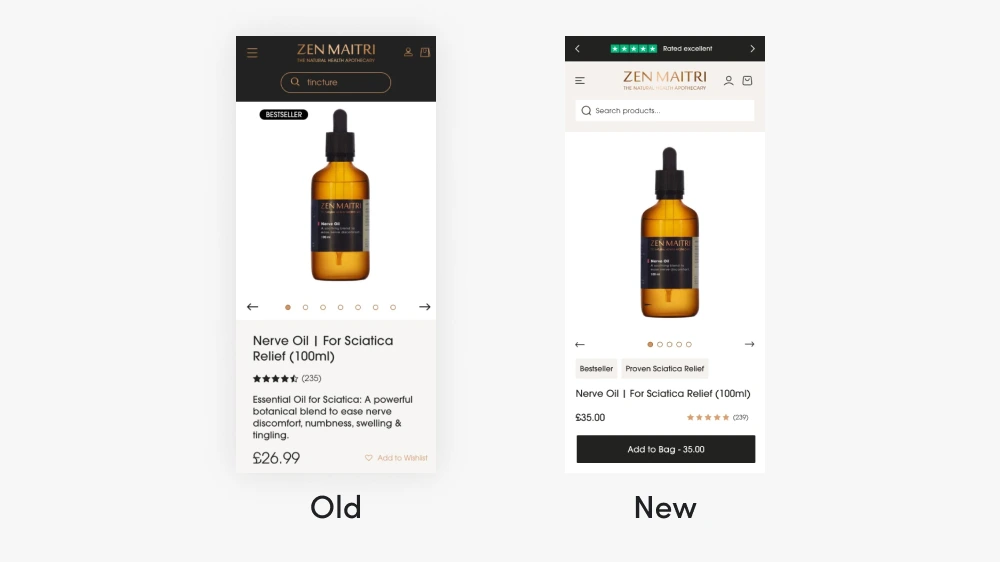
Here’s a before-and-after look at a mobile product page for Zen Maitri. By analysing user behaviour and applying targeted UX changes, we improved clarity, reduced friction, and boosted checkout performance.
4. CRO Is Behavioural Design, Not Button Testing
One of the biggest misconceptions around CRO is that it is primarily about testing colours, layouts, or CTAs.
In reality, most conversion issues stem from how users feel during a journey.
Common blockers include:
-
Uncertainty about what happens next
-
Fear of making the wrong choice
-
Lack of trust in the brand
-
Confusion caused by too many options
-
Mental effort required to understand the product
Decades of usability research from the Nielsen Norman Group have shown that cognitive load, uncertainty, and decision fatigue directly affect user behaviour, which is why effective CRO relies on empathy and design judgement rather than surface-level testing.
These are human responses. They require empathy, not automation.
A good CRO specialist reads between the numbers. They understand hesitation, anxiety, and motivation. They can spot when a user is pausing because they are thinking, not because something is broken.
AI cannot reliably do this.
5. Why Shopify CRO Needs Human Judgement
Shopify adds another layer of complexity that AI tools rarely understand properly.
Themes, apps, and platform constraints shape user experience in subtle ways. Many Shopify stores share similar layouts, which means small UX details carry more weight.
Human-led Shopify CRO considers things like:
-
Theme limitations versus user expectations
-
App overload and its impact on trust and speed
-
Mobile-first behaviour rather than desktop assumptions
-
When to customise and when to simplify
-
How brand tone influences confidence at checkout
For example, a premium brand often needs more explanation, not less. An AI tool may flag long pages as problematic, while a human designer recognises that reassurance is part of the conversion.
This is where experience with Shopify specifically matters.
You can explore more about this approach on my Shopify Conversion Rate Optimisation services page. If you’re also wondering what to look for in a specialist, it’s worth understanding what a Shopify Partner actually is and why it matters.

Even with limited theme options, strategic design decisions can create a bespoke, high-performing store. Understanding Shopify’s constraints allows us to optimise layouts, navigation, and conversions effectively.
6. AI Can Optimise for Conversion, Not Consequence
Another limitation of AI-led CRO is that it optimises for short-term metrics.
It can improve conversion rate in isolation, but it does not account for:
-
Long-term brand perception
-
Customer lifetime value
-
Retention and repeat purchases
-
Customer support burden
-
Trust erosion over time
A change that increases conversion by one percent may quietly increase returns, complaints, or churn.
Human-led CRO weighs these consequences. It asks whether a change aligns with the brand, not just whether it converts.
This is particularly important for subscription-based Shopify businesses, where retention matters far more than first-click conversion.
7. The Role of Prototyping and UX Thinking
One area where human CRO consistently outperforms automation is prototyping.
Rather than testing live changes blindly, I often design and validate solutions in Figma first. This allows stakeholders to review journeys, understand trade-offs, and align on intent before development.
AI tools do not prototype with intent. They test outcomes without context.
UX thinking adds structure to CRO. It connects data insights to design decisions, ensuring changes feel deliberate rather than reactive.
For a practical breakdown of the specific changes that move the needle, read the full guide on how to increase conversion rates on your Shopify store.
8. CRO Tools Are Assistants, Not Strategists
The healthiest CRO processes treat AI as a supporting tool, not a decision-maker.
Analytics highlight patterns. Session recordings reveal behaviour. AI helps process volume.
Humans decide:
-
What problem actually needs solving
-
Which changes align with the brand
-
Where to prioritise effort
-
When not to optimise at all
This balance is where the best results come from.
Even Google’s own Search Central guidance emphasises people-first, helpful experiences over automated optimisation, reinforcing that systems are designed to reward human-led quality rather than mechanical improvements.
9. Why Human-Led CRO Still Wins on Shopify
Across Shopify projects, the strongest results usually come from:
-
Understanding user intent before making changes
-
Reducing friction without removing reassurance
-
Improving clarity rather than adding features
-
Simplifying journeys without oversimplifying messaging
-
Aligning CRO improvements with brand positioning
These improvements rarely feel dramatic. They feel obvious in hindsight.
That is usually a sign they were designed by a human.
You can see examples of this approach in action on my Shopify case studies.
The micro-level design decisions — animations, feedback states, progress indicators — all feed into conversion. Read more on how microinteractions affect the Shopify purchase journey.
Conclusion: Conversion Rate Optimisation Has Never Been More Human
AI will continue to improve. CRO tools will become more sophisticated. Automation will remove inefficiencies.
But conversion rate optimisation is not just optimisation. It is communication, empathy, and design.
For Shopify brands that care about trust, longevity, and perception, CRO still requires human judgement. Tools can surface problems, but people solve them.
If you want to see how human-led CRO can transform your Shopify store, explore my Shopify Design Services. And if you’re in the process of finding the right person to work with, here’s what to look for when hiring a Shopify designer.
That is unlikely to change.
Frequently Asked Questions about AI & Shopify CRO
No. AI is replacing manual analysis, not strategic thinking. CRO specialists still interpret data, understand users, and design solutions. AI supports the process but does not replace human judgement.
AI can help identify issues and opportunities, especially on high-traffic stores. However, meaningful improvements usually come from human-led UX and design decisions rather than automated suggestions alone.
CRO focuses on improving outcomes such as sales or sign-ups. UX design focuses on usability, clarity, and experience. In practice, the two overlap heavily. The best CRO is grounded in strong UX principles.
No. A/B testing is a tool, not a strategy. Many conversion improvements come from understanding behaviour, reducing friction, and improving clarity without running constant tests.
Shopify stores often share similar structures, so small UX improvements can make a big difference. CRO helps brands stand out, build trust, and convert traffic more effectively within platform constraints.
Yes. Visual design and conversion performance are not the same thing. A store can look polished but still create friction or uncertainty that limits results.
This article was written by Anthony Bliss, a Shopify Expert & Freelance Shopify Designer specialising in UX and UI design for DTC brands. With 20+ years of design experience and 6+ years focused exclusively on Shopify, Anthony helps brands create stores that convert.
Let’s create your Shopify success story
Shopify Success Stories
Shopify Migration with Custom & Conversion focussed UX
Drink Finder
Bespoke Shopify Subscription UX and UI and design system
Fuzzball
A fresh mobile-first design system and bespoke product page UX
Hartnack & Co
More Shopify Articles
What Is Generative Engine Optimisation (GEO) and Why Every Shopify Brand Needs It in 2026
Getting found online used to mean one thing: ranking on Google. That is still important. But a growing share of product discovery is now happening…
Shopify Agentic Commerce: What UK Brands Need to Know
The way people discover and buy products online is changing faster than at any point since mobile shopping took off. AI assistants are no longer just…
How to Design a Shopify Website in 2026 (And When to Hire Someone Instead)
Designing a Shopify website in 2026 is not the same as it was five years ago. The platform has matured, customer expectations have risen, and the gap…
Shopify Expert
Ready to elevate your store? Start your Shopify transformation today
Shopify expert who can help elevate your store to the next level
20 years of agency and direct client experience, without the high price tag
Network of the best developers, Klaviyo experts & SEO experts perfect for big projects
This site is protected by reCAPTCHA and the Google Privacy Policy and Terms of Service apply.
Get in touch
Registered in England & Wales No. 10575474. Based in Falmouth, Cornwall, UK.
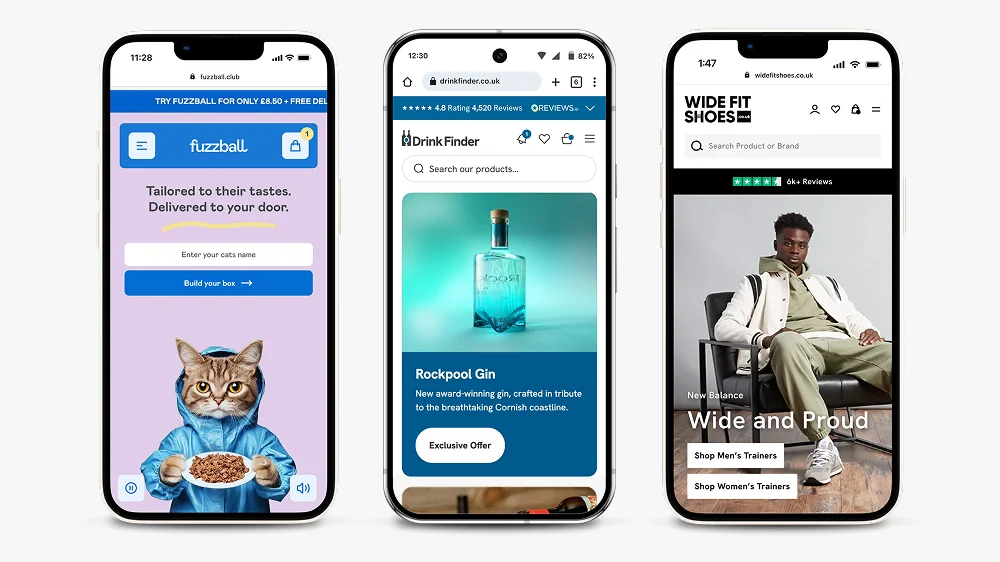
What to Look for When Hiring a Shopify Designer (2026 Guide)
Introduction
This guide will help you evaluate potential designers, understand what questions to ask, and recognise the red flags that signal you should keep looking.
1. Understand What You Actually Need
Before searching for a designer, it’s important to clarify exactly what you need. Shopify projects can vary widely:
- Developers focus on coding and custom functionality.
- Designers specialise in visuals, branding, and UX.
- Full-service experts combine design with strategic thinking.
Choosing someone who understands both UX/UI and business performance can save time, avoid costly mistakes, and ensure your store is built to convert.
A good starting point is finding a Shopify Expert with a proven track record on the platform
Consider whether you need:
- A full site redesign
- Conversion rate optimisation on an existing store
- A migration from another platform
- Ongoing design support
Understanding your specific needs will help you find a designer with the right skills and experience.
2. Look for Proven Shopify Experience
Shopify is a unique platform, and experience matters. A designer familiar with Shopify knows the platform’s capabilities, apps, and limitations, and can deliver a store that works seamlessly.
One way to verify a designer’s legitimacy is to check whether they’re a Shopify Partner, here’s a full breakdown of what that actually means and why it matters.
When evaluating potential designers, look for:
- Case studies and live stores they’ve designed — Can you see real examples of their work?
- Clear examples of conversion improvements or business results — Do they show metrics?
- Knowledge of Shopify’s ecosystem — Are they familiar with themes, apps, and UK-specific checkout or shipping requirements?
Don’t just look at pretty portfolios. Ask about the results their designs achieved. A beautiful store that doesn’t convert is just an expensive brochure.
3. Evaluate Their Design Approach
Good Shopify design goes beyond aesthetics. It should focus on user experience, intuitive navigation, and clear conversion paths.
Ask yourself:
- Does the designer create custom UX solutions or just use generic templates?
- Do they provide prototypes or wireframes before development?
- Can they optimise the customer journey from landing page to checkout?
A designer who incorporates conversion rate optimisation into their workflow is far more valuable than one who only makes a store look nice.
Questions to ask:
- “Can you show me examples of how you’ve improved conversion rates?”
- “Do you design in Figma or another tool before building?”
- “How do you approach mobile-first design?”
4. Check Their Communication and Process
Successful collaboration is crucial. Freelancers often offer a more personalised and flexible experience than large agencies. A clear process can make all the difference:
- Discovery: Understanding your business goals and audience
- Strategy: Planning UX and conversion-focused layouts
- Design: Creating prototypes or high-fidelity mockups
- Build or Handover: Ensuring your store is fully functional and optimised
Look for designers who:
- Communicate clearly and respond promptly
- Set realistic timelines and stick to them
- Provide regular updates throughout the project
- Are willing to explain their decisions
Red flags include:
- Vague timelines or scope
- Poor communication or slow responses
- No clear process outlined
- Unwillingness to show previous work or provide references
5. Don't Choose Based on Price Alone
It can be tempting to go with the cheapest option, but a Shopify website is an investment. A well-designed, conversion-focused store can pay for itself many times over.
When comparing designers, focus on:
- Expertise and experience — What results have they achieved?
- Quality of past work — Does their portfolio demonstrate strong UX thinking?
- Process and communication — Will they be easy to work with?
A £3,000 store that converts at 3% is far more valuable than a £1,000 store that converts at 0.5%.
Consider the long-term value:
- Will this store scale with your business?
- Can you easily update it yourself?
- Is it built on solid UX principles that won’t need immediate revision?
6. Read Client Testimonials and Reviews
Even narrative reviews (not just star ratings) can give insight into a designer’s professionalism, reliability, and quality of work.
Look for:
- Feedback from similar businesses — Have they worked with brands like yours?
- Examples of problem-solving or creative solutions — Do they go beyond just executing a brief?
- Consistency in delivery and communication — Are clients happy with the process?
Don’t just read the testimonials on their website. Check for reviews on:
- LinkedIn recommendations
- Clutch or similar platforms
- Direct referrals from their previous clients
7. Ask About Post-Launch Support
Your relationship with a designer shouldn’t end at launch. Ask about:
- Training on how to use Shopify
- Ongoing support or retainer options
- Who will handle updates and troubleshooting
- Handover documentation
Some designers offer ongoing relationships where they help with CRO, seasonal updates, or new feature implementation. This can be valuable if you want a long-term partner rather than a one-off project.
8. Ensure They Understand Your Brand
A great Shopify designer doesn’t just apply a template to your products. They take time to understand:
- Your brand values and positioning
- Your target audience and their needs
- Your competitive landscape
- Your unique selling points
During initial conversations, pay attention to whether they ask thoughtful questions about your business or jump straight to talking about design aesthetics.
Key Questions to Ask Before Hiring
Here’s a checklist of questions to ask potential designers:
- Can you show me similar projects you’ve completed?
- What’s your typical project timeline?
- Do you create prototypes before development?
- How do you approach mobile design?
- What’s your experience with conversion optimisation?
- Do you provide training on managing the store?
- What happens if something breaks after launch?
- Can you provide client references?
- What apps or integrations do you typically recommend?
- How do you handle revisions during the project?
Red Flags to Watch Out For
Avoid designers who:
- Promise unrealistic timelines (a quality custom store takes time)
- Can’t show live examples of their work
- Use only generic templates without customisation
- Don’t ask questions about your business
- Have no clear contract or scope of work
- Request full payment upfront
- Don’t mention UX or conversion optimisation
- Can’t explain their design decisions
Trust your instincts. If something feels off during initial conversations, it probably won’t improve during the project.
Conclusion
Finding the right Shopify designer takes research, but it’s worth the effort. Look for proven experience, a clear process, strong communication, and evidence of results, not just pretty portfolios.
The right designer will:
- Understand your business goals
- Create designs that convert
- Communicate clearly throughout the project
- Deliver on time and within budget
- Build you a store that’s easy to manage
If you’re looking for a Shopify Designer UK who combines Shopify expertise with conversion-focused UX/UI design, explore my services here or get in touch to discuss your project.
With the right designer, your Shopify store can become a powerful, high-performing asset for your business in 2025 and beyond.
Frequently Asked Questions
Freelance Shopify designers typically charge between £5,000 and £15,000 for a full store design, depending on complexity, the number of custom templates required, and how established the designer is. Agencies tend to charge more, often starting from £20,000 upwards. Be cautious of very low quotes — a £500–£1,000 “Shopify design” is usually theme customisation, not bespoke design, and may not deliver the results you’re looking for.
A designer focuses on the visual experience — layout, typography, colour, UX flows, and how the store feels to browse. A developer handles the code — building custom functionality, Liquid templating, API integrations, and app development. Many freelancers work across both, but their primary expertise will usually sit in one area. For a store that needs to look and perform well, you ideally need both skill sets, whether from one person or a small team.
Both have merits. Freelancers typically offer a more personal relationship, lower cost, and direct access to the person doing the work. Agencies offer more resource capacity and can often handle larger or more complex projects. For most growing ecommerce brands, a specialist freelance Shopify designer with a strong portfolio is often better value than a generalist agency — as long as you verify their Shopify-specific experience carefully.
Look for live stores you can actually visit, not just design mockups or screenshots. Click through the stores — are they fast? Do the product pages work well on mobile? Are there clear, conversion-focused CTAs? A portfolio that shows beautiful images but no live, functioning stores is a red flag. Also look for evidence that the designer understands your industry or product type.
Check whether they’re a Shopify Partner — Shopify’s official programme for vetted designers and developers. Ask for references from past clients and actually contact them. Look for reviews on platforms like Clutch or Google. A legitimate designer won’t hesitate to provide references or point you to their Shopify Partner profile.
A realistic timeline for a full Shopify store redesign — discovery, design, build, and QA — is between 6 and 14 weeks, depending on complexity. Be wary of designers who promise a full redesign in 1–2 weeks; that usually means a theme is being lightly customised rather than anything bespoke being built. Also bear in mind content uploading, from experience this is an area clients always underestimate and will take time, though with the use of metafields, Shopify can easily make this task less daunting.
The most important questions are: Can I see live stores you’ve built, not just mockups? Are you a Shopify Partner? What does your process look like from start to launch? How do you approach conversion design, not just aesthetics? What happens after launch — is support included? How do you handle revisions? The answers will tell you a lot about whether someone is genuinely experienced or just confident at selling themselves.
This article was written by Anthony Bliss, a Shopify Expert & Freelance Shopify Designer specialising in UX and UI design for DTC brands. With 20+ years of design experience and 6+ years focused exclusively on Shopify, Anthony helps brands create stores that convert.
Let’s create your Shopify success story
Shopify Success Stories
Shopify Migration with Custom & Conversion focussed UX
Drink Finder
Bespoke Shopify Subscription UX and UI and design system
Fuzzball
A fresh mobile-first design system and bespoke product page UX
Hartnack & Co
More Shopify Articles
What Is Generative Engine Optimisation (GEO) and Why Every Shopify Brand Needs It in 2026
Getting found online used to mean one thing: ranking on Google. That is still important. But a growing share of product discovery is now happening…
Shopify Agentic Commerce: What UK Brands Need to Know
The way people discover and buy products online is changing faster than at any point since mobile shopping took off. AI assistants are no longer just…
How to Design a Shopify Website in 2026 (And When to Hire Someone Instead)
Designing a Shopify website in 2026 is not the same as it was five years ago. The platform has matured, customer expectations have risen, and the gap…
Shopify Expert
Ready to elevate your store? Start your Shopify transformation today
Shopify expert who can help elevate your store to the next level
20 years of agency and direct client experience, without the high price tag
Network of the best developers, Klaviyo experts & SEO experts perfect for big projects
This site is protected by reCAPTCHA and the Google Privacy Policy and Terms of Service apply.
Get in touch
Registered in England & Wales No. 10575474. Based in Falmouth, Cornwall, UK.
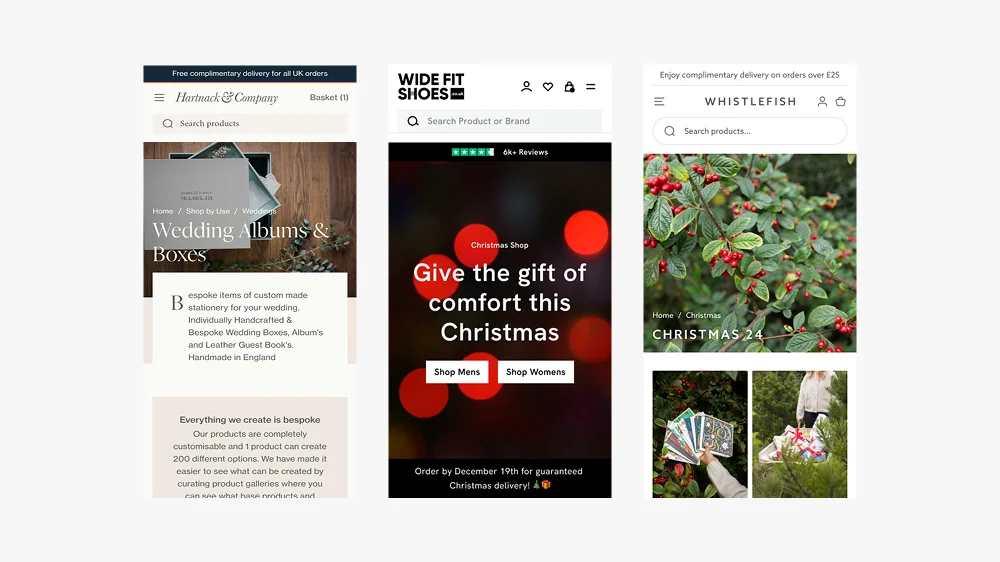
What Makes a Good Landing Page?
Introduction
As a Shopify Expert, I’ve designed landing pages for brands like Whistlefish and Wide Fit Shoes, and I’ve seen first-hand what separates a page that converts from one that underperforms.
This guide will break down the core elements of a high-performing landing page, show how scalable design systems make Shopify sites more flexible, and share practical examples you can apply to your own store. You can always view more of my Shopify website design services.
Why Landing Pages Matter in Ecommerce
Unlike a homepage, which is largely a navigation tool with trust converters, a landing page has a single focus: convert visitors. This could mean signing up for a newsletter, claiming a discount, or buying a featured product.
Landing pages aren’t just important for conversions, they’re also a powerful tool for SEO. A well-optimised landing page can rank for specific keywords, attract targeted traffic, and provide a clear entry point for new visitors. When structured properly, landing pages act as signposts that guide customers deeper into your site, helping them drill down into categories, collections, or products in a logical way.
They’re also perfect for seasonal campaigns. For example, a retailer might create a Christmas landing page, a summer sale page, or a Mother’s Day promotion. Each can be optimised for search, linked from paid ads, and slotted neatly into your navigation without disrupting your core site structure.
For Shopify store owners, this means landing pages are one of the smartest investments you can make, they boost conversions, support your SEO, and make your site more adaptable to customer journeys.
The Key Ingredients of a Good Landing Page
1. A Clear, Compelling Headline
Your headline needs to immediately explain the value proposition. For Wide Fit Shoes, the headline highlighted comfort and fit — instantly addressing customer pain points.
Top Tip: Keep headlines short and impactful. Test variations to see which resonates most.

Example: Wide Fit Shoes Christmas landing page.
2. Strong Visual Hierarchy
For the bespoke store design of the new Whistlefish website, bold typography, product imagery, and whitespace kept the focus on the art prints rather than clutter.
I designed a modular Shopify design system that ensured each block works in harmony. This means sections can be rearranged without breaking the flow, ideal for seasonal campaigns or A/B testing.

Example: The 2024 Christmas landing page showcases how the sections in Shopify 2.0 would work.
3. Trust Signals
People buy from brands they trust. Customer reviews and editorial mentions can give immediate credibility. Adding trust badges (secure checkout, delivery info, etc.) further reduced hesitation. This connects closely to conversion rate optimisation, landing pages that convert aren’t just well-designed, they reduce uncertainty at every step.
Read more about Trust Signals and how they help eccomerce stores and boost conversion rates.
4. Mobile-First Design
With more than 70% of ecommerce traffic now mobile (Statista), responsive design is non-negotiable. On Shopify 2.0, flexible sections ensure CTAs, headlines, and product images render correctly across devices.
See my guide on Conversion Rate Optimisation to learn why mobile-first design is essential.
5. A Single Call-to-Action (CTA)
The best landing pages avoid distraction. One clear CTA, repeated in the right places, ensures the user journey stays focused. For Wide Fit Shoes, the CTA was consistent: “Shop the Collection.”
Placement tips:
- The first CTA should appear “above the fold.”
- Repeat it after major sections like testimonials or product grids.
- Avoid giving visitors more than one competing choice.
6. Fast Loading Speed
Slow pages kill conversions. Optimised imagery, efficient video hosting, and Shopify’s built-in performance tools keep landing pages lightweight.
7. Scalable Design Systems
Instead of building one-off pages, I create modular systems. Each section (hero banner, testimonials, product grid, CTA) can be reused, reordered, or replaced without breaking the brand aesthetic.
This gives clients complete flexibility so they can launch new campaigns in minutes without calling in a developer.
8. Colour Psychology & Emotional Triggers
The colours you choose have a huge impact on conversions. Blue signals trust, red creates urgency, and green reassures users. For Hartnack & Co, muted heritage tones reinforced their credibility and connection to history.
Top Tip: Test CTA button colours. Sometimes a small contrast (like a warm tone against a cool background) can improve click-through rates by double digits.
More in my article on how to raise conversion rates.
9. Common Mistakes to Avoid
Some of the most common pitfalls I see on Shopify landing pages:
-
Too many CTAs make the experience confusing and lower conversions.
-
Cluttered layouts that overwhelm the user.
-
Unclear value proposition, visitors don’t know why they should care.
-
Ignoring mobile, broken layouts and lost sales.
A professional Shopify web designer can help avoid these traps.
Examples in Action
-
Whistlefish: Seasonal landing pages that showcased collections with strong headlines and visually dominant artwork See Case Study
-
Wide Fit Shoes: Clear CTAs and product-focused design that catered to customer needs around comfort and sizing. See Case Study
FAQs: What Makes a Good Landing Page?
There’s no fixed length — it depends on your product and audience. Some perform best with just a headline, image, and CTA. Others need testimonials, detailed benefits, and FAQs. The key is clarity.
No. Your homepage is a broad entry point, while a landing page is campaign-specific. Think of it as a focused tool to convert targeted traffic.
Start with small tweaks: refine headlines, test CTA colours, add trust signals, and ensure your mobile experience is flawless. For bigger gains, work with a Shopify expert UK who understands conversion rate optimisation.
Yes. You can duplicate templates and run tests using Shopify apps or external testing tools. This is one of the best ways to find out what truly resonates with your audience.
Final Thoughts
A good landing page isn’t just about aesthetics; it’s about clarity, focus, trust, and scalability. By combining strong headlines, trust signals, mobile-first design, and modular systems, you give your Shopify landing pages the best chance to convert.
If you’re ready to improve your landing pages, I’d love to help. Work with an experienced Shopify designer to save time, improve results, and grow your store. Not sure what to look for in a designer? Read the guide on hiring a Shopify designer in 2026.
This article was written by Anthony Bliss, a Shopify Expert & Freelance Shopify Designer specialising in UX and UI design for DTC brands. With 20+ years of design experience and 6+ years focused exclusively on Shopify, Anthony helps brands create stores that convert.
Partner with a Shopify expert to elevate your store
Shopify Success Stories
Shopify Migration with Custom & Conversion focussed UX
Drink Finder
Bespoke Shopify Subscription UX and UI and design system
Fuzzball
A fresh mobile-first design system and bespoke product page UX
Hartnack & Co
More Shopify Articles
What Is Generative Engine Optimisation (GEO) and Why Every Shopify Brand Needs It in 2026
Getting found online used to mean one thing: ranking on Google. That is still important. But a growing share of product discovery is now happening…
Shopify Agentic Commerce: What UK Brands Need to Know
The way people discover and buy products online is changing faster than at any point since mobile shopping took off. AI assistants are no longer just…
How to Design a Shopify Website in 2026 (And When to Hire Someone Instead)
Designing a Shopify website in 2026 is not the same as it was five years ago. The platform has matured, customer expectations have risen, and the gap…
Shopify Expert
Ready to elevate your store? Start your Shopify transformation today
Shopify expert who can help elevate your store to the next level
20 years of agency and direct client experience, without the high price tag
Network of the best developers, Klaviyo experts & SEO experts perfect for big projects
This site is protected by reCAPTCHA and the Google Privacy Policy and Terms of Service apply.
Get in touch
Registered in England & Wales No. 10575474. Based in Falmouth, Cornwall, UK.